

Your graphics add a nice touch to my presentations and I recently used them for one of my all-hands meetings. Your toolbox adds professionalism to my slides. Instead of using standard clipart.
Claude Jones, Director of Engineer, @Walmartlabs, USA

Your graphics add a nice touch to my presentations and I recently used them for one of my all-hands meetings. Your toolbox adds professionalism to my slides. Instead of using standard clipart.
Claude Jones, Director of Engineer, @Walmartlabs, USA
I needed a fresh look at some of my slides. I've tried to find a way to create a paintbrush effect, to underline, accentuate, add some color and the handwritten markers were just the things. Very easy to use, easy to size, change the color. It was an affordable, perfect solution and I'm happy to recommend it.
Anonymous, US
The crisp, clean look of the graphics, and the fact that it allowed me to easily edit and change the colors to match the template was my main reason for purchasing them.
Brandie Jenkins, E-learning Developer, USA
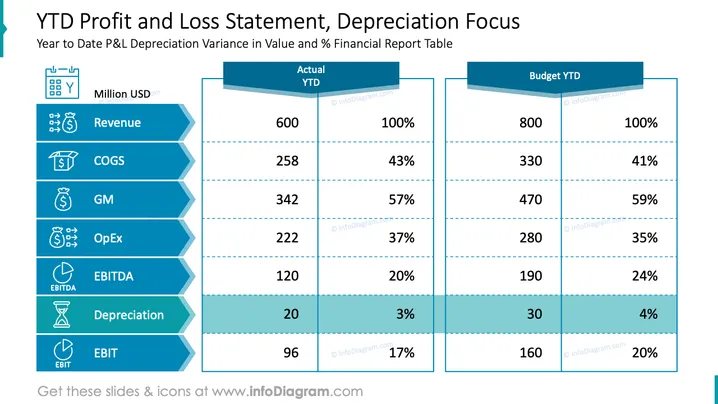
The slide presents a Year to Date (YTD) Profit and Loss Statement with a focus on depreciation. It shows a comparative table between 'Actual YTD' and 'Budget YTD' figures. Each row signifies a different financial metric such as Revenue, COGS (Cost of Goods Sold), GM (Gross Margin), OpEx (Operating Expenses), EBITDA (Earnings Before Interest, Taxes, Depreciation, and Amortization), Depreciation, and EBIT (Earnings Before Interest and Taxes), with corresponding values and percentages. This indicates a detailed financial performance analysis where revenues are at 600 million USD (100% of the budget), and there's a notice of depreciation which is 20 million USD (3% of the budget), representing significant points of financial health.
The slide has a structured and easy-to-read layout, utilizing color contrast and simple iconography to highlight key financial metrics. The design is optimized for clarity, making it suitable for executive business presentations.



