
Reviews
Ihre Grafiken verleihen meinen Präsentationen eine nette Note, und ich habe sie kürzlich für eines meiner All-Hands-Meetings verwendet. Ihre Toolbox verleiht meinen Folien Professionalität, anstatt Standard-Clipart zu verwenden.
Ich brauchte einen neuen Blick auf einige meiner Folien. Ich habe versucht, einen Weg zu finden, einen Pinselschlag-Effekt zu erzielen, um zu unterstreichen, hervorzuheben, Farbe hinzuzufügen, und die handgeschriebenen Markierungen waren genau das Richtige. Sehr einfach zu bedienen, leicht in der Größe zu ändern, die Farbe zu ändern. Es war eine erschwingliche, perfekte Lösung und ich empfehle sie gerne weiter.
Die klare, saubere Optik der Grafiken und die Tatsache, dass ich die Farben leicht bearbeiten und an die Vorlage anpassen konnte, war mein Hauptgrund für den Kauf.
Description
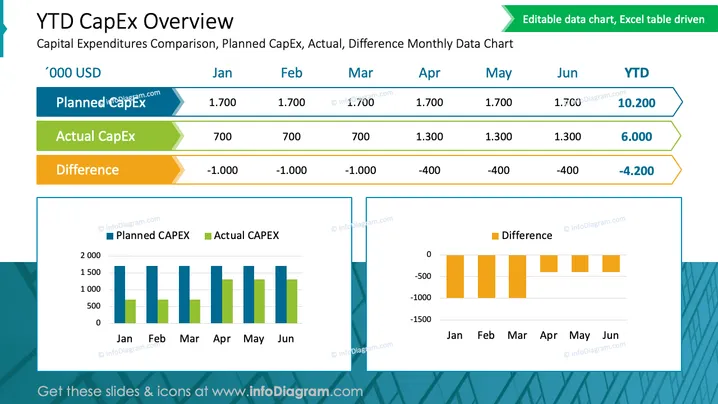
YTD CapEx Overview
Slide Content
The slide is titled "YTD CapEx Overview" and sub-titled "Capital Expenditures Comparison, Planned CapEx, Actual, Difference Monthly Data Chart." It features a chart that compares the planned and actual capital expenditures (CapEx) as well as the difference between them for each month, from January to June, and including the year-to-date (YTD) totals. Planned CapEx appears consistent at 1,700 '000 USD for each month. Actual CapEx shows variation, with a YTD total of 6,000 '000 USD. The Difference indicates under-spending in earlier months with improvement noted in later months, culminating in a YTD difference of -4,200 '000 USD.
Graphical Look
- The slide title is bold and prominent in dark blue text at the top of the slide.
- Three rows of data under the title each have a unique color; planned CapEx is blue, actual CapEx is green, and the difference is orange.
- There are two charts below the data rows: a bar chart on the left and a smaller bar chart on the right.
- The left bar chart depicts planned and actual CapEx for each month with vertical bars, using pale blue and green to differentiate.
- The right bar chart uses horizontal orange bars to show the monthly difference.
- A light blue border frames both charts.
- The top-right corner has an annotation indicating the chart is editable and Excel table driven.
The slide has a clean and professional look with a good color scheme to differentiate data sets. The use of both vertical and horizontal bar charts allows for an easy comparison of planned versus actual expenditures and their respective differences.
Use Cases
- To present financial performance in board meetings, highlighting the budgetary adherence or variance in capital expenditure.
- In project management reviews, to compare projected versus actual spending for stakeholders.
- During financial planning sessions, the slide can be utilized to discuss cost containment strategies based on historical spending data.
- To facilitate quarterly or mid-year financial audits by providing a visual reference for capital expenditure trends.
How to Edit
How to edit text & colors

How to expand / shorten diagram

How to Replace Icons in infoDiagram PPT


