
Reviews
Your graphics add a nice touch to my presentations and I recently used them for one of my all-hands meetings. Your toolbox adds professionalism to my slides. Instead of using standard clipart.
I needed a fresh look at some of my slides. I've tried to find a way to create a paintbrush effect, to underline, accentuate, add some color and the handwritten markers were just the things. Very easy to use, easy to size, change the color. It was an affordable, perfect solution and I'm happy to recommend it.
The crisp, clean look of the graphics, and the fact that it allowed me to easily edit and change the colors to match the template was my main reason for purchasing them.
Description
Year Timeline Projects Summary
Slide Content
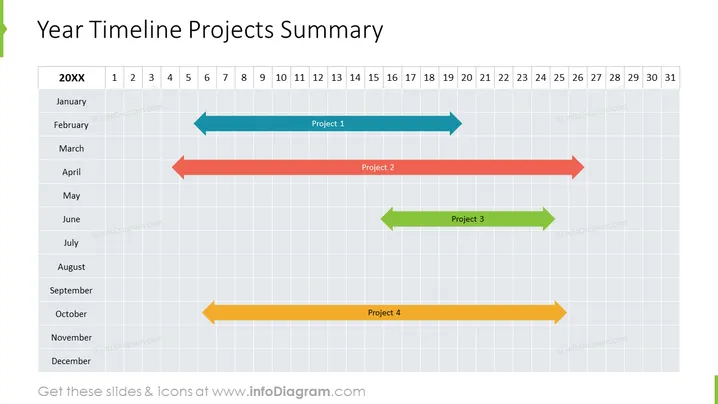
The slide presents a timeline for four different projects over a 12-month period. Each project is represented by a horizontal arrow with different colors and spans various lengths, denoting the project duration. "Project 1" starts in January and ends in March, depicted by a light blue arrow. "Project 2" spans from February to April, indicated by a rose-colored arrow. "Project 3" is shown by a green arrow, starting in March and concluding in April. Lastly, "Project 4" is an amber arrow running from October to December.
Graphical Look
- The slide's background is a grid representing a timeline, with columns for months and rows for days.
- Horizontal arrows with different colors (light blue, rose, green, and amber) represent the duration of projects.
- The months (January to December) are listed on the left side, whereas the days (labeled 1 - 31) are at the top.
- Each project has a label (Project 1, Project 2, etc.) centered on its corresponding arrow.
- The slide title "Year Timeline Projects Summary" is in a large bold font at the top of the slide.
The slide design is minimalistic and uses a muted color palette. The use of arrows aids in clearly conveying the duration and sequence of the projects.
Use Cases
- Visualizing project timelines during a project planning meeting to assess resource allocation.
- Presenting an annual overview of project schedules in a stakeholder or client briefing.
- Monitoring progress in a project portfolio management review to ensure adherence to timelines.
- Facilitating discussions on workflow and potential overlaps in projects during a team meeting.
How to Edit
How to edit text & colors

How to expand / shorten diagram

How to Replace Icons in infoDiagram PPT


