
Reviews
Sus gráficos añaden un toque agradable a mis presentaciones y recientemente los usé para una de mis reuniones generales. Su conjunto de herramientas añade profesionalismo a mis diapositivas. En lugar de usar imágenes prediseñadas estándar.
Necesitaba un aspecto fresco para algunas de mis diapositivas. Había intentado encontrar una forma de crear un efecto de pincel, de subrayar, acentuar, añadir algo de color y los marcadores escritos a mano fueron justo lo que necesitaba. Muy fácil de usar, fácil de ajustar el tamaño, cambiar el color. Fue una solución asequible y perfecta, y estoy feliz de recomendarla.
El aspecto nítido y limpio de los gráficos, y el hecho de que me permitiera editar y cambiar fácilmente los colores para que coincidieran con la plantilla fue mi principal razón para comprarlos.
Description
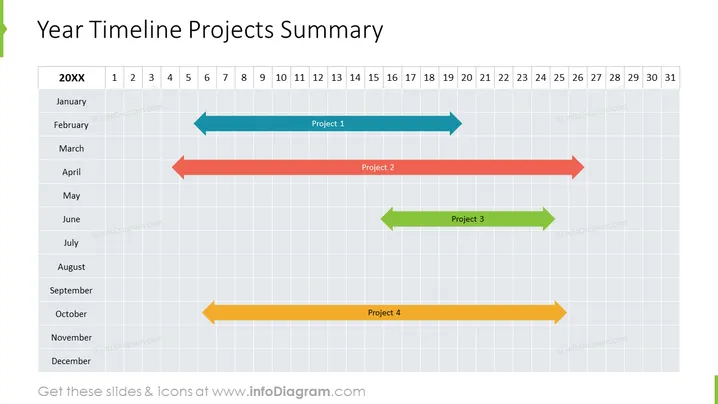
Year Timeline Projects Summary
Slide Content
The slide presents a timeline for four different projects over a 12-month period. Each project is represented by a horizontal arrow with different colors and spans various lengths, denoting the project duration. "Project 1" starts in January and ends in March, depicted by a light blue arrow. "Project 2" spans from February to April, indicated by a rose-colored arrow. "Project 3" is shown by a green arrow, starting in March and concluding in April. Lastly, "Project 4" is an amber arrow running from October to December.
Graphical Look
- The slide's background is a grid representing a timeline, with columns for months and rows for days.
- Horizontal arrows with different colors (light blue, rose, green, and amber) represent the duration of projects.
- The months (January to December) are listed on the left side, whereas the days (labeled 1 - 31) are at the top.
- Each project has a label (Project 1, Project 2, etc.) centered on its corresponding arrow.
- The slide title "Year Timeline Projects Summary" is in a large bold font at the top of the slide.
The slide design is minimalistic and uses a muted color palette. The use of arrows aids in clearly conveying the duration and sequence of the projects.
Use Cases
- Visualizing project timelines during a project planning meeting to assess resource allocation.
- Presenting an annual overview of project schedules in a stakeholder or client briefing.
- Monitoring progress in a project portfolio management review to ensure adherence to timelines.
- Facilitating discussions on workflow and potential overlaps in projects during a team meeting.
How to Edit
How to edit text & colors

How to expand / shorten diagram

How to Replace Icons in infoDiagram PPT


