
Reviews
Your graphics add a nice touch to my presentations and I recently used them for one of my all-hands meetings. Your toolbox adds professionalism to my slides. Instead of using standard clipart.
I needed a fresh look at some of my slides. I've tried to find a way to create a paintbrush effect, to underline, accentuate, add some color and the handwritten markers were just the things. Very easy to use, easy to size, change the color. It was an affordable, perfect solution and I'm happy to recommend it.
The crisp, clean look of the graphics, and the fact that it allowed me to easily edit and change the colors to match the template was my main reason for purchasing them.
Description
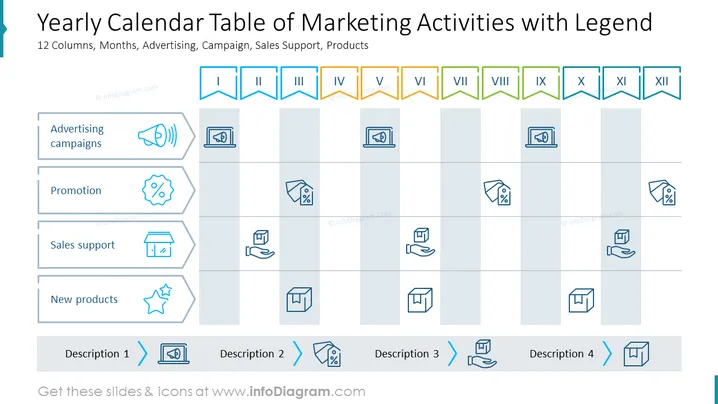
##Slide contents: The Annual Marketing Calendar can be used if you want to show the marketing activities that are prepared for the year. The marketing calendar PowerPoint Template includes different marketing activities and social media marketing campaigns that will take place during the year. Once you create a marketing plan, the marketing campaign calendar will help you keep track of your company's projects and goals. This marketing calendar template with legends contains 12 columns for each month of the year and 4 rows which include advertising campaigns, promotions, sales support, and new products. You can use icons for each marketing activity which will make it easy for your audience to visualize the content strategy of the slide. You can use this template if you are a marketing manager who wants to share the different content marketing ideas planned for the year with your marketing team. This calendar view will help you plan for the different marketing activities throughout the year. It will make it easy for you and your team members to prepare for the different types of content planned throughout the year. You can download this template on Google Slides and Keynote. ##Slide Infographic Description: White Background, Table With Legends, Roman Numbers, Ribbon Icon, Speaker Icon, Online Marketing Icon, Percent Icon, Sale Icon, Discount Icon, Retail Icon, Box Icon, Hand Icon, Box on Hand Icon, Stars Icon, Production Icon
How to Edit
How to edit text & colors

How to expand / shorten diagram

How to Replace Icons in infoDiagram PPT


