
Reviews
Sus gráficos añaden un toque agradable a mis presentaciones y recientemente los usé para una de mis reuniones generales. Su conjunto de herramientas añade profesionalismo a mis diapositivas. En lugar de usar imágenes prediseñadas estándar.
Necesitaba un aspecto fresco para algunas de mis diapositivas. Había intentado encontrar una forma de crear un efecto de pincel, de subrayar, acentuar, añadir algo de color y los marcadores escritos a mano fueron justo lo que necesitaba. Muy fácil de usar, fácil de ajustar el tamaño, cambiar el color. Fue una solución asequible y perfecta, y estoy feliz de recomendarla.
El aspecto nítido y limpio de los gráficos, y el hecho de que me permitiera editar y cambiar fácilmente los colores para que coincidieran con la plantilla fue mi principal razón para comprarlos.
Description
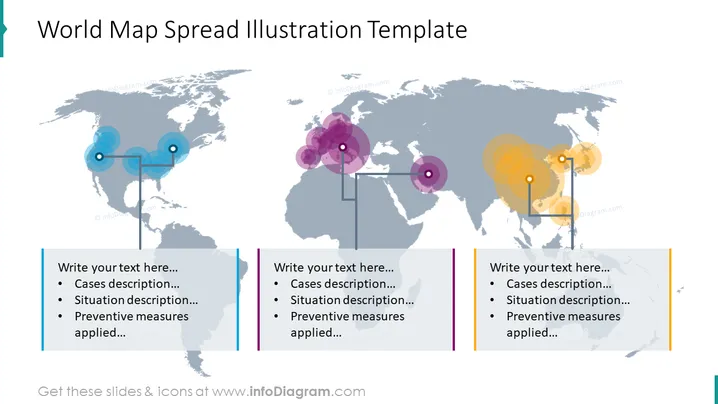
World Map Spread Illustration Template
Slide Content
The slide titled "World Map Spread Illustration Template" appears to be a tool for presenting data with a geographic component. There are three text boxes where the presenter can insert descriptions, including "Cases description," "Situation description," and "Preventive measures applied." Each box is associated with a graphical element—colored circles with varying opacities placed over a world map—that likely represents different regions or intensity of the case studies.
Graphical Look
- A gray-scale world map serves as the background, covering the entire slide.
- Overlaid on the map are three sets of translucent colored circles (blue, purple, and yellow) of different sizes, suggesting variable data points or impact zones.
- Each circle set has a vertical line connecting it to a corresponding text box with additional horizontal connectors between circles of the same color.
- Text boxes are aligned at the bottom of the slide beneath each colored circle set, accented with a colored line matching the circle's color.
- Each text box contains a bulleted list with placeholder text signaling where to insert relevant information.
The overall look of the slide is modern and clean, utilizing minimalistic design elements to focus on the data representation. The color-coding and spatial arrangement effectively direct attention to specific geographic areas.
Use Cases
- To present global statistics or data related to different regions, highlighting areas of interest or concern.
- In reports or proposals to visualize the spread of a phenomenon, like a disease, product reach, or market data.
- During strategic meetings discussing global initiatives, to showcase territorial progress or issues.
- In educational settings to explain historical events, demographic studies, or environmental impacts on a global scale.
How to Edit
How to edit text & colors

How to expand / shorten diagram

How to Replace Icons in infoDiagram PPT


