

Your graphics add a nice touch to my presentations and I recently used them for one of my all-hands meetings. Your toolbox adds professionalism to my slides. Instead of using standard clipart.
Claude Jones, Director of Engineer, @Walmartlabs, USA

Your graphics add a nice touch to my presentations and I recently used them for one of my all-hands meetings. Your toolbox adds professionalism to my slides. Instead of using standard clipart.
Claude Jones, Director of Engineer, @Walmartlabs, USA
I needed a fresh look at some of my slides. I've tried to find a way to create a paintbrush effect, to underline, accentuate, add some color and the handwritten markers were just the things. Very easy to use, easy to size, change the color. It was an affordable, perfect solution and I'm happy to recommend it.
Anonymous, US
The crisp, clean look of the graphics, and the fact that it allowed me to easily edit and change the colors to match the template was my main reason for purchasing them.
Brandie Jenkins, E-learning Developer, USA
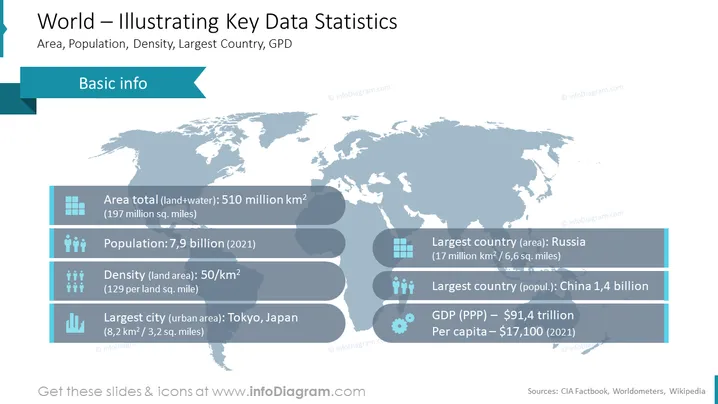
The slide titled "World – Illustrating Key Data Statistics" presents information about global statistics, including the total area of land and water, population, density, largest country by area and population, and GDP. Specifically, the world’s total area is noted to be 510 million square kilometers, with a population of 7.9 billion as of 2021. The density is 50 per square kilometer, Russia is the largest country by land area at 17 million square kilometers, China has the largest population with 1.4 billion people, and the GDP (PPP) is $91.4 trillion with a per capita income of $17,100 as of 2021. Tokyo, Japan is highlighted as the largest city in terms of urban area.
The slide’s design is professional and clean, using contrasting blue tones and icons for easy interpretation of the statistical data.



