
Your graphics add a nice touch to my presentations and I recently used them for one of my all-hands meetings. Your toolbox adds professionalism to my slides. Instead of using standard clipart.
Claude Jones, Director of Engineer, @Walmartlabs, USA

Your graphics add a nice touch to my presentations and I recently used them for one of my all-hands meetings. Your toolbox adds professionalism to my slides. Instead of using standard clipart.
Claude Jones, Director of Engineer, @Walmartlabs, USA

I needed a fresh look at some of my slides. I've tried to find a way to create a paintbrush effect, to underline, accentuate, add some color and the handwritten markers were just the things. Very easy to use, easy to size, change the color. It was an affordable, perfect solution and I'm happy to recommend it.
Anonymous, US
The crisp, clean look of the graphics, and the fact that it allowed me to easily edit and change the colors to match the template was my main reason for purchasing them.
Brandie Jenkins, E-learning Developer, USA
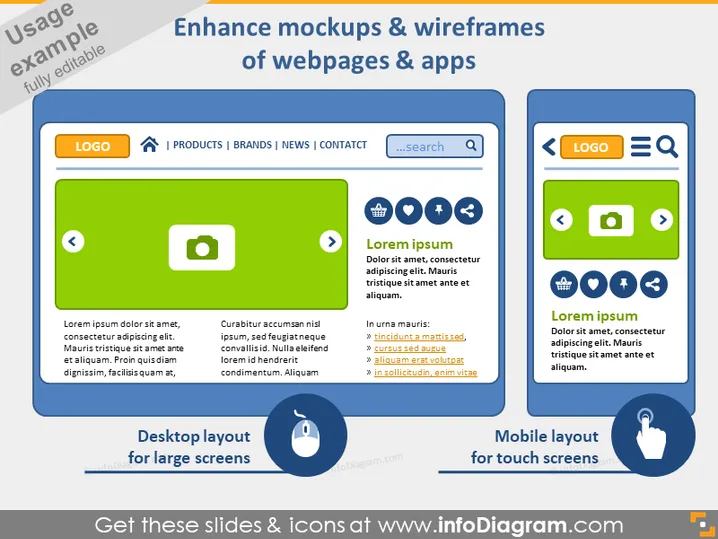
This slide is designed to demonstrate the enhancement of mockups and wireframes for webpages and apps by showcasing desktop and mobile layouts. It emphasizes the adaptability of designs to different screen sizes. The slide features two comparisons between layouts: "Desktop layout for large screens" exhibits a conceptual web interface with elements such as a search bar and navigation, whereas "Mobile layout for touch screens" presents a simplified version of the interface suited for mobile devices, emphasizing larger icons and touch-friendly elements.
The overall look of the slide is clean and modern, utilizing contrasting colors to differentiate between the desktop and mobile layouts. The use of icons and minimal text makes the information easily digestible.
The PowerPoint slide is designed to showcase how mockups and wireframes for webpages and apps can be optimized for different screen sizes. It contrasts "Desktop layout for large screens" with a detailed interface including navigation and search, against "Mobile layout for touch screens" that simplifies elements for usability. The desktop example contains placeholder headings and a green highlight, while the mobile counterpart emphasizes thumb-friendly design with a blue highlight. Both sections present concepts important in user interface design: large, interactive buttons and icons for the mobile layout and a more comprehensive navigation for desktops.
The slide has a professional and polished appearance, using contrasting colors and clean lines to present information in a visually distinct way. The use of tablet-shaped figures helps to clearly differentiate between the desktop and mobile layout concepts.


