
Reviews
Your graphics add a nice touch to my presentations and I recently used them for one of my all-hands meetings. Your toolbox adds professionalism to my slides. Instead of using standard clipart.
I needed a fresh look at some of my slides. I've tried to find a way to create a paintbrush effect, to underline, accentuate, add some color and the handwritten markers were just the things. Very easy to use, easy to size, change the color. It was an affordable, perfect solution and I'm happy to recommend it.
The crisp, clean look of the graphics, and the fact that it allowed me to easily edit and change the colors to match the template was my main reason for purchasing them.
Description
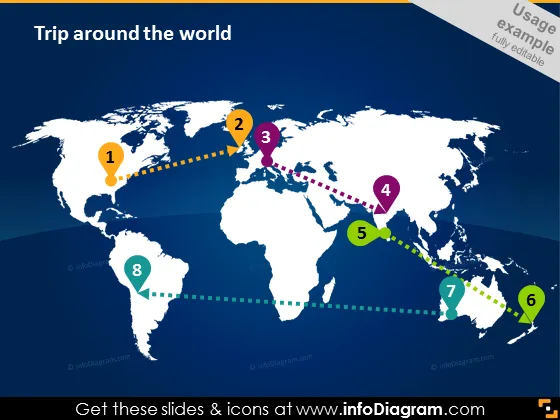
Trip around the world
Slide Content
The slide titled "Trip around the world" appears to depict a sequential journey across various geographical locations marked from 1 to 8, suggesting an itinerary or phases in a global process. Each numbered step could represent different stages in an international expansion, milestones in a project, or destinations in a travel plan. The connecting lines between the numbers indicate a flow or progression from one point to another, emphasizing the concept of movement and connection on a global scale.
Graphical Look
- The slide has a dark blue background suggesting a map of the world.
- There is a white world map centered in the middle of the slide.
- Numbers from 1 to 8 serve as markers, each enclosed in differently colored circles, and are scattered across various continents on the map.
- Colored dotted lines connect these markers, creating a path that zigzags from one destination to the next.
- The lines and markers use a variety of bright colors like orange, green, purple, and yellow, providing visual contrast and indicating sequence or progress.
- The overall design is minimalistic with a focus on the path and the sequence of numbers.
The slide has a clean and professional appearance using a world map as the central element to visually represent a global journey. The bright color coding and dotted lines effectively draw attention to the sequence of the trip or project phases.
Use Cases
- Presenting a company's international expansion plan, showing new markets or offices.
- Describing a multi-stop itinerary for educational or cultural exchange programs.
- Outlining the phases of a globally distributed project or product launch.
- Illustrating the route for a worldwide logistics or supply chain strategy.
How to Edit
How to edit text & colors

How to expand / shorten diagram

How to Replace Icons in infoDiagram PPT


