
Reviews
Your graphics add a nice touch to my presentations and I recently used them for one of my all-hands meetings. Your toolbox adds professionalism to my slides. Instead of using standard clipart.
I needed a fresh look at some of my slides. I've tried to find a way to create a paintbrush effect, to underline, accentuate, add some color and the handwritten markers were just the things. Very easy to use, easy to size, change the color. It was an affordable, perfect solution and I'm happy to recommend it.
The crisp, clean look of the graphics, and the fact that it allowed me to easily edit and change the colors to match the template was my main reason for purchasing them.
Description
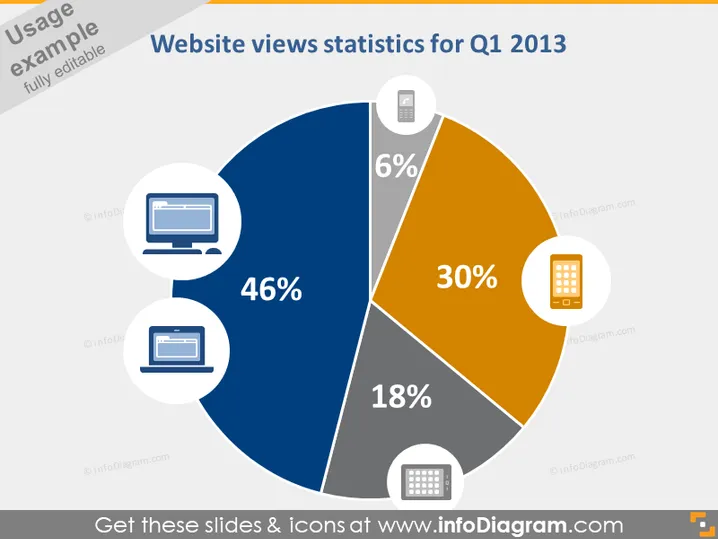
Website views statistics for Q1 2013
Slide Content
The slide presents website views statistics for Q1 2013, illustrating device-based distribution. Desktop views lead with 46%, indicating a heavy reliance on traditional computers for website access. Mobile views follow at 30%, showing a significant but lesser engagement via phones. Tablet views are at 18%, hinting at moderate usage. Lastly, other devices account for only 6% of views, suggesting alternative devices play a minor role in website visits during this period.
Graphical Look
- A large pie chart dominates the slide, with four segments representing different device types.
- The largest segment is dark blue, illustrating desktop views at 46%.
- An orange segment shows mobile views at 30%.
- The dark grey segment indicates tablet views at 18%.
- A light grey segment represents other devices at 6%.
- Each segment of the pie chart is connected to a circular icon with a related device image.
- The icons include a desktop computer, a mobile phone, and a stylized image of a tablet.
- Each icon is encapsulated in a white circle with a light grey border.
- Percentage values are prominently displayed in white font within each segment.
- The slide’s background is a light grey tone, providing contrast to the vibrant colors of the pie chart.
The slide has a clean and professional appearance with a clear focus on the data represented by the pie chart. The use of contrasting colors and simple device icons facilitates quick comprehension of the information presented.
Use Cases
- Presenting website traffic analysis in a marketing meeting to highlight device preferences of the audience.
- Incorporating into an investor presentation to show growth in mobile engagement over previous quarters.
- Using during a web development team briefing to underscore the importance of designing for different devices.
- Including in a quarterly business review to stakeholders to illustrate user behavior trends and inform strategy adjustments.
How to Edit
How to edit text & colors

How to expand / shorten diagram

How to Replace Icons in infoDiagram PPT


