
Reviews
The icons are fantastic, easy to use, and will add value to any project or presentation. Keep up the great work.
I love how simple infoDiagram's solutions are and the personal interest they took in my work. Recommended 1000%!
The crisp, clean look of the graphics, and the fact that it allowed me to easily edit and change the colors to match the template was my main reason for purchasing them.
Description
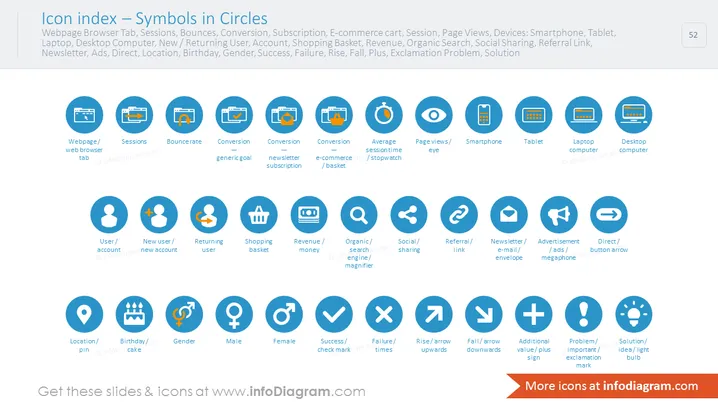
Icon index — Symbols in Circles
Slide Content
The slide titled "Icon index — Symbols in Circles" serves as a visual index for various icons used to represent digital and business concepts such as webpage browsing, sessions, user types, devices, and gender. Each icon is encapsulated within a circle and is paired with a descriptive label. Concepts like "Bounce rate," "Revenue," and "Social Sharing" are symbolized by relevant icons, indicating a session's bounce rate with a jumping arrow, money for revenue, and interconnected nodes for social sharing, respectively.
Graphical Look
- The slide background is a gradient of blue shades.
- A total of 24 icons are aligned in a grid layout, with 4 rows and 6 columns.
- Each icon is placed within a blue circle with a lighter blue fill.
- Below every icon, there is a text label describing the concept represented by the icon.
- The icons and text are white, creating a strong contrast against the blue circles.
- Icon designs range from simple symbols, such as an eye for "Page views," to more complex representations, like a shopping basket for "Shopping basket."
- Icons include representations for both abstract concepts, like "Conversion" with a goalpost icon, and concrete objects, like "Desktop Computer."
- All the icons are evenly spaced and have a consistent design style that conveys simplicity and modernity.
The slide has a clean and modern appearance, with a cohesive color scheme that allows the white icons to stand out. The orderly grid layout provides a quick-reference visual glossary for the audience.
Use Cases
- To explain digital marketing metrics and website analytics in a corporate presentation.
- Within user experience (UX) or user interface (UI) design documents to reference common iconography.
- In a training session for new employees in marketing, sales, or IT departments to familiarize them with industry-specific symbols.
- As a visual aid in a strategy meeting to outline various channels and performance indicators for a digital campaign.
How to Edit
How to edit text & colors

How to expand / shorten diagram

How to Replace Icons in infoDiagram PPT


