
Reviews
Your graphics add a nice touch to my presentations and I recently used them for one of my all-hands meetings. Your toolbox adds professionalism to my slides. Instead of using standard clipart.
I needed a fresh look at some of my slides. I've tried to find a way to create a paintbrush effect, to underline, accentuate, add some color and the handwritten markers were just the things. Very easy to use, easy to size, change the color. It was an affordable, perfect solution and I'm happy to recommend it.
The crisp, clean look of the graphics, and the fact that it allowed me to easily edit and change the colors to match the template was my main reason for purchasing them.
Description
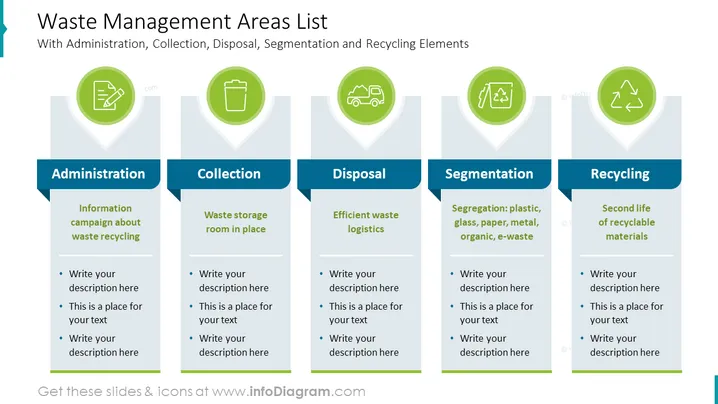
Waste Management Areas List
Slide Content
The slide is titled "Waste Management Areas List," indicating it covers various aspects of waste management. This includes Administration (campaigning about waste recycling), Collection (having a waste storage room in place), Disposal (efficient waste logistics), Segmentation (sorting of waste into categories like plastic, glass, paper, metal, organic, and electronic waste), and Recycling (giving a second life to recyclable materials). Each section contains a header, an explanatory bullet point, and placeholder text for further customization.
Graphical Look
- The slide is divided into five content sections, each highlighted with a different icon inside a green circle.
- Each section features a dark blue header with the area name and a light blue rectangle containing the explanatory text.
- Icons represent a clipboard for Administration, a trash bin for Collection, a garbage truck for Disposal, separated waste types for Segmentation, and recycling arrows for Recycling.
- The background is white, and each section is separated by light grey lines that direct focus to the individual areas.
- The slide utilizes a flat design style, with simple graphics free of unnecessary detail or texture.
The overall visual composition is clean and organized, with uniformity in design elements that make the information easily digestible. The color scheme utilizing shades of blue and green promotes a sense of environmental responsibility.
Use Cases
- To educate audiences about the different stages of waste management during an environmental conference.
- As part of a training module for new employees in a waste management facility to understand the workflow.
- To present a company's green initiatives related to waste management to stakeholders.
- For environmental consultants to illustrate best practices and processes in waste management to clients.
How to Edit
How to edit text & colors

How to expand / shorten diagram

How to Replace Icons in infoDiagram PPT


