
Reviews
Sus gráficos añaden un toque agradable a mis presentaciones y recientemente los usé para una de mis reuniones generales. Su conjunto de herramientas añade profesionalismo a mis diapositivas. En lugar de usar imágenes prediseñadas estándar.
Necesitaba un aspecto fresco para algunas de mis diapositivas. Había intentado encontrar una forma de crear un efecto de pincel, de subrayar, acentuar, añadir algo de color y los marcadores escritos a mano fueron justo lo que necesitaba. Muy fácil de usar, fácil de ajustar el tamaño, cambiar el color. Fue una solución asequible y perfecta, y estoy feliz de recomendarla.
El aspecto nítido y limpio de los gráficos, y el hecho de que me permitiera editar y cambiar fácilmente los colores para que coincidieran con la plantilla fue mi principal razón para comprarlos.
Description
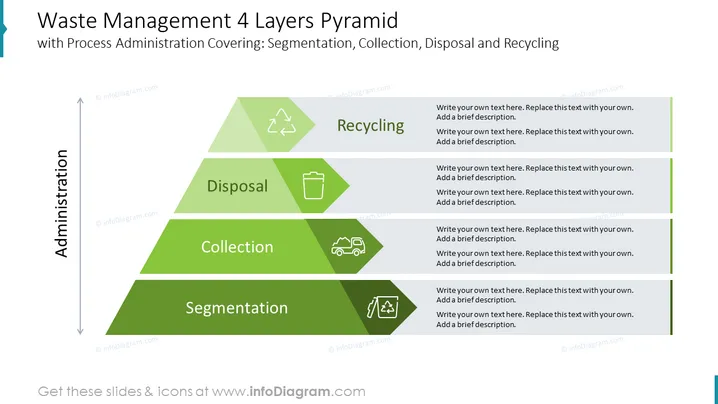
Waste Management 4 Layers Pyramid
This PowerPoint slide provides a comprehensive overview of the waste management process, encompassing four key stages: segmentation, collection, disposal, and recycling. The slide effectively utilizes a pyramid structure to illustrate the hierarchical nature of waste management, with each layer representing a distinct phase in the process. The visual representation and concise textual descriptions make this slide an ideal tool for educating audiences about waste management practices and promoting sustainable waste-handling strategies.
What Does This Waste Management 4 Layers Pyramid Include?
- A pyramid structure divided into four distinct layers, each representing a crucial stage in the waste management process.
- A vibrant color scheme that enhances visual appeal and aids in differentiating between the various stages of waste management.
- Descriptive labels for each layer, providing clear explanations of the activities involved in each stage.
- Outline icons of recycling, reusage, disposal, waste, collection, cargo, transportation, logistics, segmentation
This Waste Management 4 Layers Pyramid is a part of our Triple Bottom Line Sustainable Business Strategy PPT Template.
How to Edit
How to edit text & colors

How to expand / shorten diagram

How to Replace Icons in infoDiagram PPT


