
Reviews
Your graphics add a nice touch to my presentations and I recently used them for one of my all-hands meetings. Your toolbox adds professionalism to my slides. Instead of using standard clipart.
I needed a fresh look at some of my slides. I've tried to find a way to create a paintbrush effect, to underline, accentuate, add some color and the handwritten markers were just the things. Very easy to use, easy to size, change the color. It was an affordable, perfect solution and I'm happy to recommend it.
The crisp, clean look of the graphics, and the fact that it allowed me to easily edit and change the colors to match the template was my main reason for purchasing them.
Description
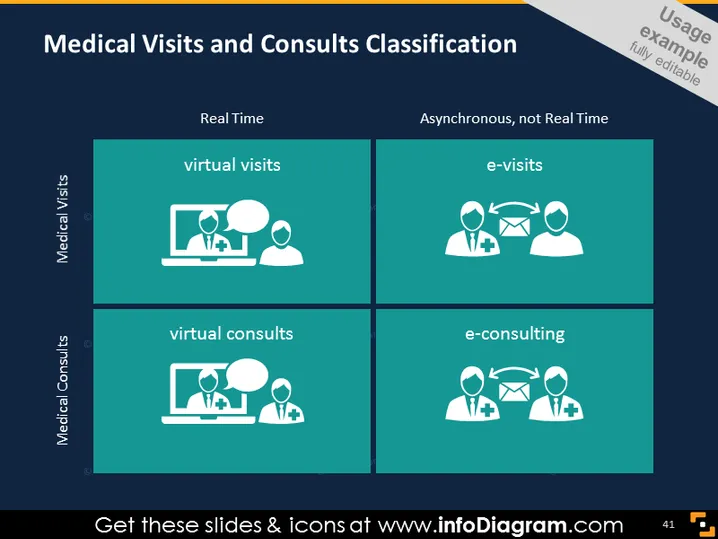
Medical Visits and Consults Classification
Slide Content
The PowerPoint slide titled "Medical Visits and Consults Classification" categorizes medical services into four quadrants based on two dimensions: "Real Time" versus "Asynchronous, not Real Time" and "Medical Visits" versus "Medical Consults." The "Real Time" dimension includes "virtual visits," which are live interactions between patients and providers, and "virtual consults," which are live discussions for medical advice or diagnosis. The "Asynchronous, not Real Time" dimension consists of "e-visits," where patients initiate digital communication that doesn't require an immediate response, and "e-consulting," which refers to medical professionals seeking advice from specialists without the patient present.
Graphical Look
- The slide is divided into four equal quadrants with a white border separating them.
- Each quadrant has a title: "virtual visits," "e-visits," "virtual consults," and "e-consulting."
- Above the quadrants on the left and right sides are additional categorizing headers: "Medical Visits" and "Medical Consults."
- The top of the slide has two overarching categories: "Real Time" and "Asynchronous, not Real Time."
- There are icons in each quadrant representing different concepts:
- A computer screen with two human figures for "virtual visits."
- Two human figures with arrows and a medical plus sign for "e-visits."
- A computer screen with human figures and a medical plus sign for "virtual consults."
- Multiple human figures with arrows and a medical plus sign for "e-consulting."
- The background of the slide is a dark teal, and the font color contrasts in white.
The overall look of the slide is clean and professional, making use of simple graphics to visually distinguish between the different types of medical interactions. The use of icons and minimal text helps communicate complex ideas quickly and efficiently.
Use Cases
-
Use Cases
-
Presenting at medical conferences to explain the emerging trends of telemedicine and virtual healthcare.
-
Training healthcare staff on the different modes of patient engagement and consultation offered by a medical facility.
-
Pitching telehealth services to investors or stakeholders to illustrate the scope and categorization of services.
-
Educating patients about their options for remote medical consultations and visits through digital platforms or applications.
How to Edit
How to edit text & colors

How to expand / shorten diagram

How to Replace Icons in infoDiagram PPT


