
Reviews
Sus gráficos añaden un toque agradable a mis presentaciones y recientemente los usé para una de mis reuniones generales. Su conjunto de herramientas añade profesionalismo a mis diapositivas. En lugar de usar imágenes prediseñadas estándar.
Necesitaba un aspecto fresco para algunas de mis diapositivas. Había intentado encontrar una forma de crear un efecto de pincel, de subrayar, acentuar, añadir algo de color y los marcadores escritos a mano fueron justo lo que necesitaba. Muy fácil de usar, fácil de ajustar el tamaño, cambiar el color. Fue una solución asequible y perfecta, y estoy feliz de recomendarla.
El aspecto nítido y limpio de los gráficos, y el hecho de que me permitiera editar y cambiar fácilmente los colores para que coincidieran con la plantilla fue mi principal razón para comprarlos.
Description
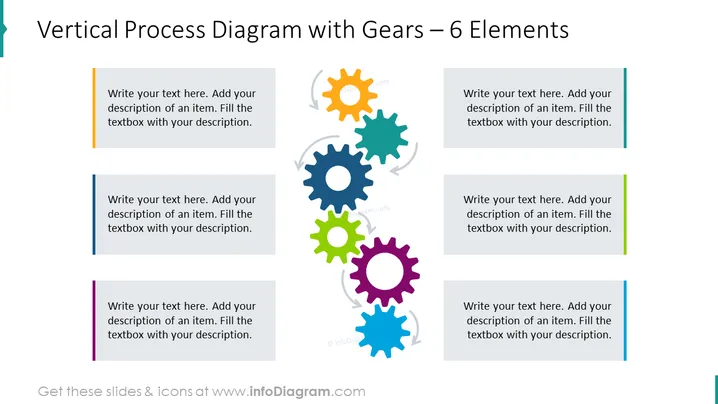
Vertical Process Diagram with Gears – 6 Elements
Slide Content
The PowerPoint slide presents a "Vertical Process Diagram with Gears – 6 Elements," which most likely illustrates a process or workflow involving six interconnected steps or phases, symbolized by gears. The gears suggest that each element is essential for the movement of the overall mechanism, emphasizing the interdependency of the process stages. Each gear is paired with a text box that provides space for a description of that step, suggesting customization for the specific topic being presented.
Graphical Look
- The slide background is white, providing a neutral canvass for the content.
- Six colorful gears are aligned vertically in the center of the slide, each with a different color (orange, light blue, dark blue, green, purple, light teal) and a unique associated arrow, implying movement and interaction.
- Beside each gear is a corresponding rectangular text box for descriptions, oriented to the left and right alternatively. These boxes have a muted color background with a colored side bar coordinating with the gear color.
- There is a light grey-colored watermark-style graphic behind the gears, contributing to the design without overpowering the main elements.
The slide has a clean, modern appearance with vivid colors that draw attention to the central gear graphics. The use of gears as a metaphor for process steps creates a dynamic visual representation of a workflow or system components.
Use Cases
- Illustrating the steps in a business process or workflow during team meetings or presentations.
- Demonstrating product development phases, where each gear represents a milestone in the lifecycle.
- Highlighting organizational structure or departmental interaction where gears symbolize interdepartmental collaboration.
- Using in training materials to depict a sequence of actions necessary for completing a task or project.
How to Edit
How to edit text & colors

How to expand / shorten diagram

How to Replace Icons in infoDiagram PPT


