
Reviews
Ihre Grafiken verleihen meinen Präsentationen eine nette Note, und ich habe sie kürzlich für eines meiner All-Hands-Meetings verwendet. Ihre Toolbox verleiht meinen Folien Professionalität, anstatt Standard-Clipart zu verwenden.
Ich brauchte einen neuen Blick auf einige meiner Folien. Ich habe versucht, einen Weg zu finden, einen Pinselschlag-Effekt zu erzielen, um zu unterstreichen, hervorzuheben, Farbe hinzuzufügen, und die handgeschriebenen Markierungen waren genau das Richtige. Sehr einfach zu bedienen, leicht in der Größe zu ändern, die Farbe zu ändern. Es war eine erschwingliche, perfekte Lösung und ich empfehle sie gerne weiter.
Die klare, saubere Optik der Grafiken und die Tatsache, dass ich die Farben leicht bearbeiten und an die Vorlage anpassen konnte, war mein Hauptgrund für den Kauf.
Description
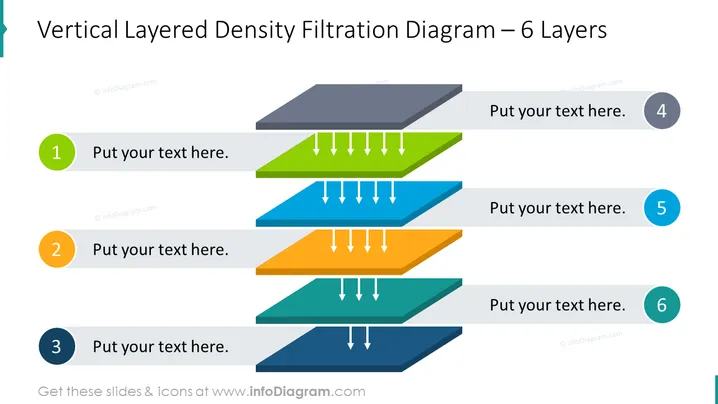
Vertical Layered Density Filtration Diagram – 6 Layers
Slide Content
The slide presents a "Vertical Layered Density Filtration Diagram – 6 Layers", which appears to illustrate a process or system that segregates or filters through six distinct levels. Each layer is numbered from 1 to 6 and has a placeholder for text, likely explanations or details about that specific layer. Arrows point downwards, symbolizing a flow or filtration through the layers. Layers numbered 4 to 6 have additional space for further text on the right side.
Graphical Look
- The diagram features six layers with descending shades of color to represent density or stages.
- Each layer has a corresponding circle number from 1 to 6, color-matched to the layer.
- Downward-facing arrows between each layer signify progression or filtration.
- The layers are stylized with a 3D effect to give the impression of depth.
- There are text placeholders on each layer to input relevant information.
- Additional text placeholders are aligned to the right of the layers 4, 5, and 6.
The slide uses a clean and modern design, with a color gradient and 3D effects that offer a professional appearance. The arrows enhance the visual representation of process flow or filtration.
Use Cases
- To showcase a step-by-step process or system in a corporate presentation.
- To illustrate stages of product development or project phases.
- To explain a multi-level filtration or segregation mechanism in engineering or science presentations.
- To depict layers of management or operations in an organizational structure.
How to Edit
How to edit text & colors

How to expand / shorten diagram

How to Replace Icons in infoDiagram PPT


