
Reviews
Your graphics add a nice touch to my presentations and I recently used them for one of my all-hands meetings. Your toolbox adds professionalism to my slides. Instead of using standard clipart.
I needed a fresh look at some of my slides. I've tried to find a way to create a paintbrush effect, to underline, accentuate, add some color and the handwritten markers were just the things. Very easy to use, easy to size, change the color. It was an affordable, perfect solution and I'm happy to recommend it.
The crisp, clean look of the graphics, and the fact that it allowed me to easily edit and change the colors to match the template was my main reason for purchasing them.
Description
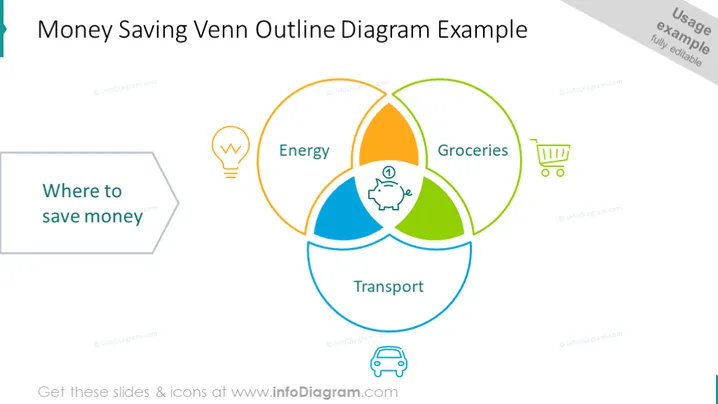
Money Saving Venn Outline Diagram Example
Slide Content
The slide presents a Venn diagram illustrating potential areas to save money. The diagram has three overlapping circles labeled "Energy," "Transport," and "Groceries," each paired with an icon representing the category (a light bulb for energy, a shopping cart for groceries, and a car for transport). The central overlapping area is marked with a piggy bank icon, symbolizing the core money-saving opportunities where all three categories intersect.
Graphical Look
- Three overlapping circles creating a Venn diagram, each with a different color (orange for Energy, green for Groceries, blue for Transport).
- An icon accompanies each category label: a light bulb for Energy, a shopping cart for Groceries, and a car for Transport.
- The central overlapping area contains a piggy bank icon, indicating a focus on savings found at the intersection of all three areas.
- A callout shape with the text "Where to save money" pointing towards the Venn diagram.
- The slide background is white, with the title "Money Saving Venn Outline Diagram Example" at the top.
- The color scheme is bright and uses a mix of primary and secondary colors.
The overall look of the slide is simple and clean, with a focused use of icons and color to designate different areas related to saving money. The visual structure is guided by the Venn diagram, which serves to illustrate the interrelated aspects of cost-saving.
Use Cases
- To spark a discussion on cost reduction strategies during a financial planning meeting.
- As part of a budgeting workshop, to visually represent areas where households or businesses can cut expenses.
- During a presentation on personal finance, to exemplify how overlapping expenses can provide opportunities for savings.
- In an educational context, to teach concepts of budget management and financial efficiency.
How to Edit
How to edit text & colors

How to expand / shorten diagram

How to Replace Icons in infoDiagram PPT


