
Reviews
Sus gráficos añaden un toque agradable a mis presentaciones y recientemente los usé para una de mis reuniones generales. Su conjunto de herramientas añade profesionalismo a mis diapositivas. En lugar de usar imágenes prediseñadas estándar.
Necesitaba un aspecto fresco para algunas de mis diapositivas. Había intentado encontrar una forma de crear un efecto de pincel, de subrayar, acentuar, añadir algo de color y los marcadores escritos a mano fueron justo lo que necesitaba. Muy fácil de usar, fácil de ajustar el tamaño, cambiar el color. Fue una solución asequible y perfecta, y estoy feliz de recomendarla.
El aspecto nítido y limpio de los gráficos, y el hecho de que me permitiera editar y cambiar fácilmente los colores para que coincidieran con la plantilla fue mi principal razón para comprarlos.
Description
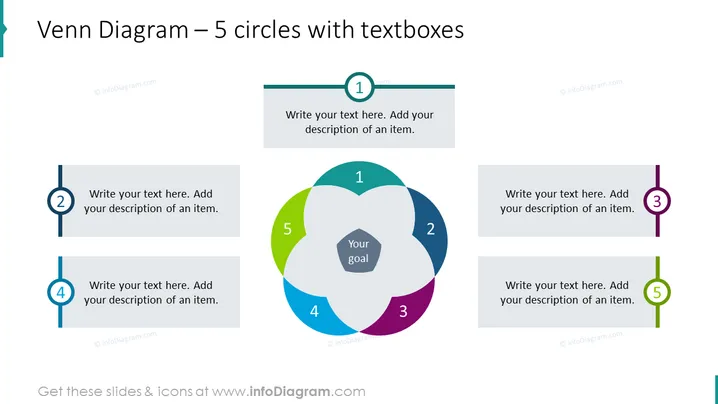
Venn Diagram – 5 circles with textboxes
Slide Content
The slide presents a Venn diagram consisting of 5 overlapping circles, each representing an element that contributes to achieving a central goal. Listed as numeric points from 1 to 5 around the diagram, each point has a textbox for additional information. This format suggests the importance of interconnectivity and the combination of different aspects needed to focus on a common objective, which is emphasized at the center as "Your goal".
Graphical Look
- A large, central Venn diagram with five overlapping circles in different colors: blue, green, purple, grey, and teal.
- The overlap of the circles creates a central pentagonal shape labeled "Your goal".
- Numeric labels from 1 to 5 are placed on the individual circles, with matching textboxes aligned horizontally outside the Venn diagram.
- Textboxes have ample space for writing descriptions and are connected to their respective circle with a line matching the color of the circle.
- The slide utilizes a white background which accentuates the colorful diagram and textboxes.
- Colors are soft and professional, without any overwhelming visual elements.
The slide has a clean and professional appearance, with a simple color scheme that effectively highlights each segment. The design is symmetrically balanced around the central goal, creating a well-organized and visually appealing presentation tool.
Use Cases
- To display the interaction between different components within a project or strategy and how they relate to a central goal or objective.
- For brainstorming sessions, where each circle could represent an idea or department whose contributions are necessary for the success of a central initiative.
- As an analytical tool in business meetings to discuss and visualize the overlap between various market segments or customer groups.
- In educational settings, to illustrate concepts that have multiple perspectives or dimensions that intersect.
How to Edit
How to edit text & colors

How to expand / shorten diagram

How to Replace Icons in infoDiagram PPT


