

Your graphics add a nice touch to my presentations and I recently used them for one of my all-hands meetings. Your toolbox adds professionalism to my slides. Instead of using standard clipart.
Claude Jones, Director of Engineer, @Walmartlabs, USA

Your graphics add a nice touch to my presentations and I recently used them for one of my all-hands meetings. Your toolbox adds professionalism to my slides. Instead of using standard clipart.
Claude Jones, Director of Engineer, @Walmartlabs, USA
I needed a fresh look at some of my slides. I've tried to find a way to create a paintbrush effect, to underline, accentuate, add some color and the handwritten markers were just the things. Very easy to use, easy to size, change the color. It was an affordable, perfect solution and I'm happy to recommend it.
Anonymous, US
The crisp, clean look of the graphics, and the fact that it allowed me to easily edit and change the colors to match the template was my main reason for purchasing them.
Brandie Jenkins, E-learning Developer, USA
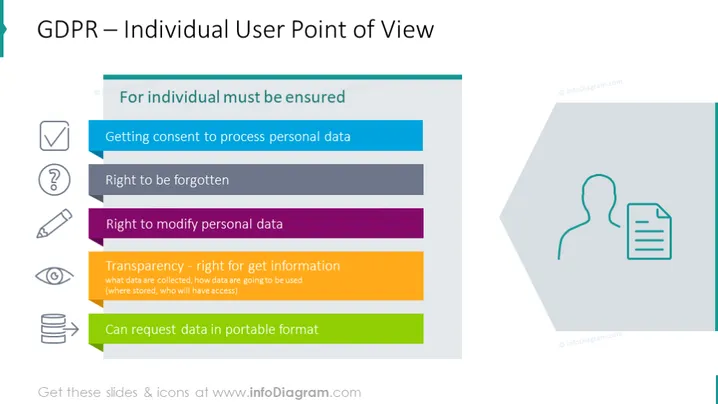
The slide presents key rights under the General Data Protection Regulation (GDPR) from the perspective of the individual user. It emphasizes the importance of ensuring individuals' rights to control their personal data. The "Getting consent to process personal data" signifies that explicit permission must be obtained before using someone's data. "Right to be forgotten" is about allowing individuals to have their data erased. "Right to modify personal data" ensures users can correct their data. The "Transparency - right for get information" elaborates on the individual's right to know how their data is collected and used. Lastly, "Can request data in portable format" indicates individuals can ask for their data in a format that can be easily transferred elsewhere.
The slide has a balanced layout with text on the left and graphics on the right, creating a visually appealing and easy-to-follow presentation for viewers. The use of icons and colors aids in distinguishing different points, enhancing comprehension and retention.



