Reviews
Your graphics add a nice touch to my presentations and I recently used them for one of my all-hands meetings. Your toolbox adds professionalism to my slides. Instead of using standard clipart.
I needed a fresh look at some of my slides. I've tried to find a way to create a paintbrush effect, to underline, accentuate, add some color and the handwritten markers were just the things. Very easy to use, easy to size, change the color. It was an affordable, perfect solution and I'm happy to recommend it.
The crisp, clean look of the graphics, and the fact that it allowed me to easily edit and change the colors to match the template was my main reason for purchasing them.
Description
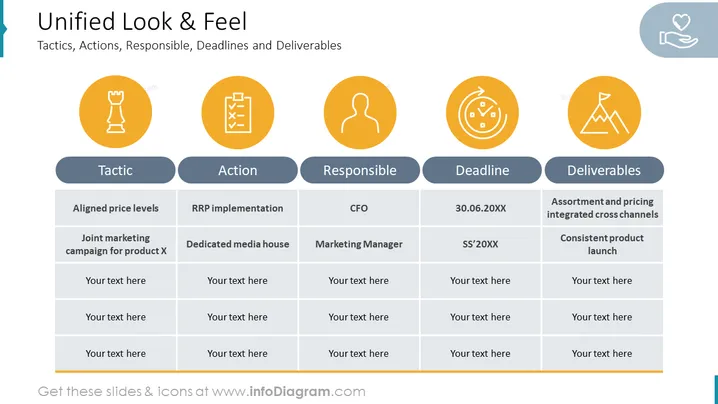
Unified Look & Feel
Slide Content:
- Tactics: Actions to be taken to achieve the goal.
- Actions: Specific tasks that need to be completed, such as RRP implementation and a dedicated media house.
- Responsible: The person or team responsible for each action.
- Deadlines: The date by which each action must be completed.
- Deliverables: The outcome of each action.
Graphical Look of this PowerPoint slide:
- Simple, clean design with a white background and black text.
- Slide title is at the top of the slide in a large, bold font.
- Table of tactics, actions, responsible, deadlines, and deliverables is centered in the middle of the slide.
- The slide also includes a few simple icons.
Overall Analysis of the slide:
- Well-organized and easy to read.
- Table format is effective for presenting information.
- Use of bold and regular fonts helps to distinguish between different elements of the table.
- Simple, clean design is professional and visually appealing.
Use Cases
You can use such a slide in a variety of settings, such as:

- A marketing presentation outlining the key tactics and deliverables for a new product launch.
- A sales presentation outlining the steps involved in closing a major deal.
- A project management presentation outlining the key milestones and deliverables for a new project.
- A business development presentation outlining the key initiatives and goals for the next quarter or year.
How to Edit
How to edit text & colors

How to expand / shorten diagram

How to Replace Icons in infoDiagram PPT


