
Reviews
Vos graphiques ajoutent une belle touche à mes présentations et je les ai récemment utilisés pour l'une de mes réunions générales. Votre boîte à outils ajoute du professionnalisme à mes diapositives. Au lieu d'utiliser des cliparts standards.
J'avais besoin d'un nouveau regard sur certaines de mes diapositives. J'ai essayé de trouver un moyen de créer un effet de pinceau, de souligner, d'accentuer, d'ajouter de la couleur et les marqueurs manuscrits étaient exactement ce qu'il fallait. Très facile à utiliser, facile à ajuster la taille, à changer la couleur. C'était une solution abordable et parfaite et je suis heureux de la recommander.
L'aspect net et épuré des graphiques, et le fait qu'il m'ait permis d'éditer et de changer facilement les couleurs pour les adapter au modèle, ont été les principales raisons de mon achat.
Description
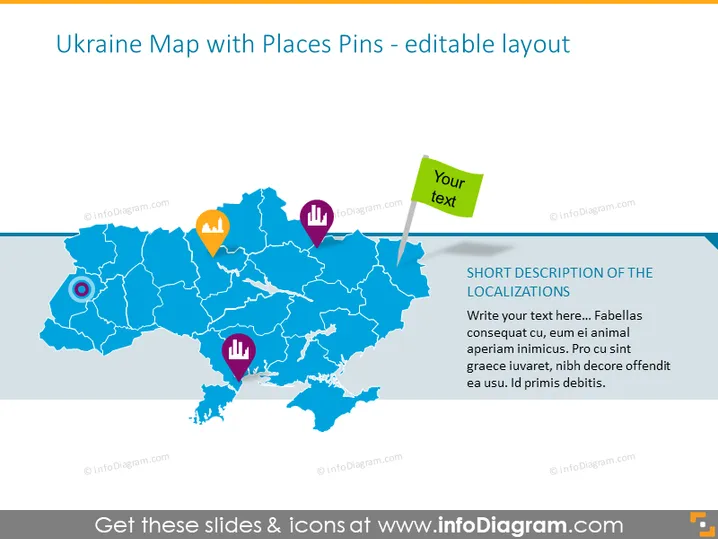
Ukraine Map with Places Pins - editable layout
Slide Content
The PowerPoint slide features a map of Ukraine marked with various place pins symbolizing different locations or points of interest. These pins come in different colors and shapes, illustrating diversity. The slide also includes spaces for text—a short description of the localizations and a customizable text box, suggesting that the presenter can modify and input relevant details specific to their presentation. The placeholder texts encourage the presenter to add descriptions or commentary about the pin locations on the map.
Graphical Look
- The background of the slide is white.
- A large, blue-colored map of Ukraine dominates the slide, with regions separated by white borders.
- Various colored pins with icons are placed on the map, indicating different locations.
- An orange pin with a star icon possibly signifies a place of importance or interest.
- A purple pin with a bar graph icon may represent statistical data or economic information.
- A red pin with an up arrow might denote growth or success.
- A blue pin with a magnifying glass suggests inspection or focus on a particular area.
- A small green placard with a white edge extends from the upper right corner, including editable text "Your text".
- The slide employs a mix of flat design for the map and a three-dimensional effect for the place pins.
The slide has a clean and modern look with a compelling visual hierarchy that guides the viewer from the map to the specific points of interest via the colorful pins.
Use Cases
- Presenting geographical business expansion plans or current operational locations in Ukraine.
- Displaying market research data specific to regions within Ukraine, like customer distribution, sales regions, or competitor analysis.
- Highlighting areas of interest for tourism or investment opportunities within Ukraine.
- Marking locations for logistics purposes such as warehouses, transportation hubs, or supply chain analyses.
How to Edit
How to edit text & colors

How to expand / shorten diagram

How to Replace Icons in infoDiagram PPT


