
Reviews
Sus gráficos añaden un toque agradable a mis presentaciones y recientemente los usé para una de mis reuniones generales. Su conjunto de herramientas añade profesionalismo a mis diapositivas. En lugar de usar imágenes prediseñadas estándar.
Necesitaba un aspecto fresco para algunas de mis diapositivas. Había intentado encontrar una forma de crear un efecto de pincel, de subrayar, acentuar, añadir algo de color y los marcadores escritos a mano fueron justo lo que necesitaba. Muy fácil de usar, fácil de ajustar el tamaño, cambiar el color. Fue una solución asequible y perfecta, y estoy feliz de recomendarla.
El aspecto nítido y limpio de los gráficos, y el hecho de que me permitiera editar y cambiar fácilmente los colores para que coincidieran con la plantilla fue mi principal razón para comprarlos.
Description
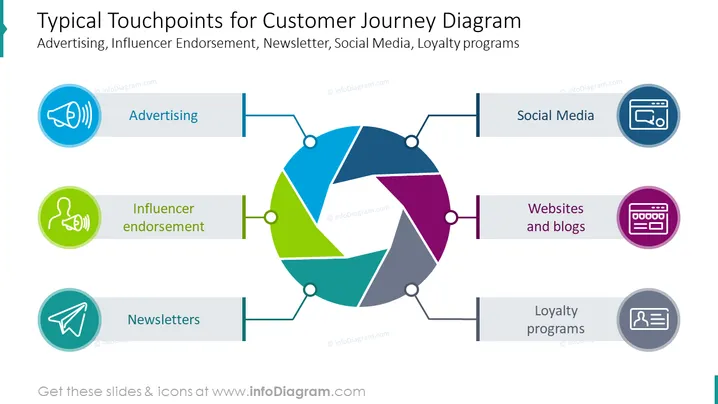
Typical Touchpoints for Customer Journey Diagram
Slide Content:
The slide is a visual representation of the common touchpoints in a customer's journey with a brand. It identifies Advertising, Influencer Endorsement, Newsletters, Social Media, Websites and Blogs, and Loyalty Programs as key interaction points. These touchpoints are crucial for businesses to engage with customers at various stages, from creating awareness to fostering loyalty and encouraging advocacy.
Graphical Look:
- A central circular diagram with segments connected to different touchpoints.
- Colored icons representing each touchpoint: a megaphone for Advertising, a speaking figure for Influencer - Endorsement, a paper airplane for Newsletters, a social media symbol, a browser window for Websites and Blogs, and a loyalty card for Loyalty Programs.
- Horizontal lines connecting the icons to the circular diagram.
- Each touchpoint label is accompanied by a colored bar matching the icon.
- The background of the slide is white, highlighting the colorful diagram and icons.
The overall design is clean and modern, with a central diagram that effectively draws the eye to the various customer touchpoints. The use of distinct colors and clear icons facilitates easy recognition of each touchpoint's role in the customer journey.
Use Cases:
This slide would be effectively utilized in marketing strategy meetings, customer experience workshops, and digital marketing seminars. It could also be used to brief teams on customer engagement strategies or in presentations to stakeholders to illustrate the importance of integrated marketing communications.
How to Edit
How to edit text & colors

How to expand / shorten diagram

How to Replace Icons in infoDiagram PPT


