
Reviews
Your graphics add a nice touch to my presentations and I recently used them for one of my all-hands meetings. Your toolbox adds professionalism to my slides. Instead of using standard clipart.
I needed a fresh look at some of my slides. I've tried to find a way to create a paintbrush effect, to underline, accentuate, add some color and the handwritten markers were just the things. Very easy to use, easy to size, change the color. It was an affordable, perfect solution and I'm happy to recommend it.
The crisp, clean look of the graphics, and the fact that it allowed me to easily edit and change the colors to match the template was my main reason for purchasing them.
Description
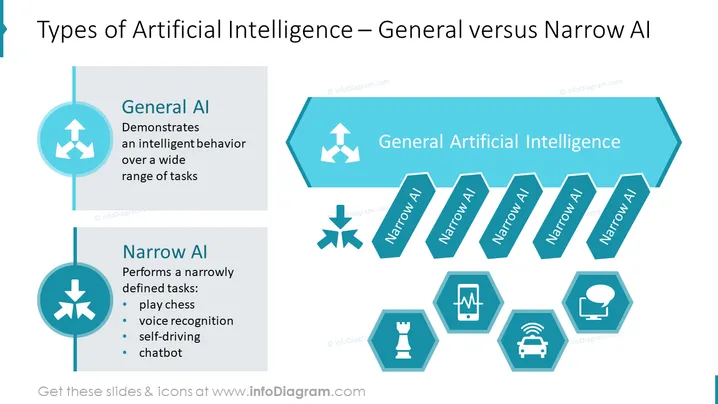
Types of Artificial Intelligence – General versus Narrow AI
Slide Content
The slide compares General AI and Narrow AI, with General AI described as demonstrating intelligent behavior over a wide range of tasks, implying versatility and adaptability. Narrow AI is detailed as performing narrowly defined tasks like playing chess, indicating specialization in specific areas such as voice recognition, self-driving technology, and chatbot interactions. These examples illustrate the focused capabilities of Narrow AI in contrast to the broader scope of General AI.
Graphical Look
- The slide's background is white.
- Title is in dark text, aligned to the left.
- Two main content areas: a circle connected to a vertical line on the left, presenting General AI and Narrow AI each with icons above the text and bullet lists below.
- On the right, a horizontal arrow points to several hexagons labeled with "Narrow AI."
- Each Narrow AI hexagon is paired with its own icon to represent different applications: chess, heartbeat, car, speech bubble.
- Icons are in white set against teal hexagons.
- The color scheme consists of shades of teal and blue.
- The layout is balanced with a mixture of geometric shapes (circles, hexagons, and arrows).
The slide has a clean, modern look with a clear color scheme that visually distinguishes between General AI and Narrow AI. Icons are used effectively to represent different AI applications.
Use Cases
- Introducing the concept of AI-types in educational or training settings.
- Discussing technological capabilities during business strategy meetings.
- Briefing on AI advancements during tech conferences or seminars.
- Analyzing product features that utilize AI in marketing presentations.
How to Edit
How to edit text & colors

How to expand / shorten diagram

How to Replace Icons in infoDiagram PPT


