
Reviews
Your graphics add a nice touch to my presentations and I recently used them for one of my all-hands meetings. Your toolbox adds professionalism to my slides. Instead of using standard clipart.
I needed a fresh look at some of my slides. I've tried to find a way to create a paintbrush effect, to underline, accentuate, add some color and the handwritten markers were just the things. Very easy to use, easy to size, change the color. It was an affordable, perfect solution and I'm happy to recommend it.
The crisp, clean look of the graphics, and the fact that it allowed me to easily edit and change the colors to match the template was my main reason for purchasing them.
Description
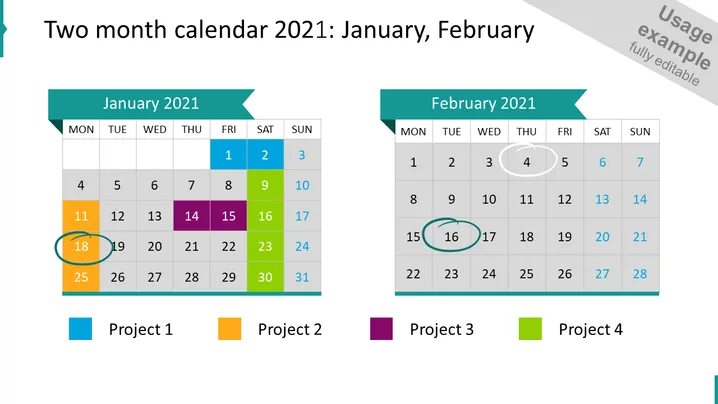
Two month calendar 2021: January, February
Slide Content
The PowerPoint slide displays a two-month calendar for January and February 2021 with highlighted dates signifying important milestones or events for four different projects. Each project is color-coded: Project 1 (blue), Project 2 (orange), Project 3 (purple), and Project 4 (green). For instance, Project 1's highlighted date, January 18th, theoretically indicates a deadline or a major project event. Similarly, other colored dates correspond to significant project-related events or milestones in both January and February.
Graphical Look
- The slide has a large title at the top in bold black font on a white background.
- Each month is represented in its own column with a teal arrow-shaped header stating the month and year.
- Days of the week are listed in the second row beneath each month's header, abbreviated to three letters.
- Dates are shown in a grid below with weekends in light grey and weekdays in white.
- Color-coded squares highlight specific dates for four different projects, with corresponding legend squares at the bottom.
- Circles are drawn around specific dates, distinguishing them further, matching the colors in the legend.
- The legend at the bottom associates a color with each project for easy reference.
The slide has a clean and professional look with a clear color-coding system to visually distinguish between different projects. The layout is well-organized, with a grid format for the calendar and clearly labeled dates.
Use Cases
- To track and present project timelines during a business meeting.
- For visualizing deadlines and important events across multiple projects in a corporate presentation.
- To assist in coordinating team efforts by highlighting key dates in a project management workshop.
- As a planning tool for stakeholders to view upcoming milestones at a glance during a strategy session.
How to Edit
How to edit text & colors

How to expand / shorten diagram

How to Replace Icons in infoDiagram PPT


