
Reviews
Ihre Grafiken verleihen meinen Präsentationen eine nette Note, und ich habe sie kürzlich für eines meiner All-Hands-Meetings verwendet. Ihre Toolbox verleiht meinen Folien Professionalität, anstatt Standard-Clipart zu verwenden.
Ich brauchte einen neuen Blick auf einige meiner Folien. Ich habe versucht, einen Weg zu finden, einen Pinselschlag-Effekt zu erzielen, um zu unterstreichen, hervorzuheben, Farbe hinzuzufügen, und die handgeschriebenen Markierungen waren genau das Richtige. Sehr einfach zu bedienen, leicht in der Größe zu ändern, die Farbe zu ändern. Es war eine erschwingliche, perfekte Lösung und ich empfehle sie gerne weiter.
Die klare, saubere Optik der Grafiken und die Tatsache, dass ich die Farben leicht bearbeiten und an die Vorlage anpassen konnte, war mein Hauptgrund für den Kauf.
Description
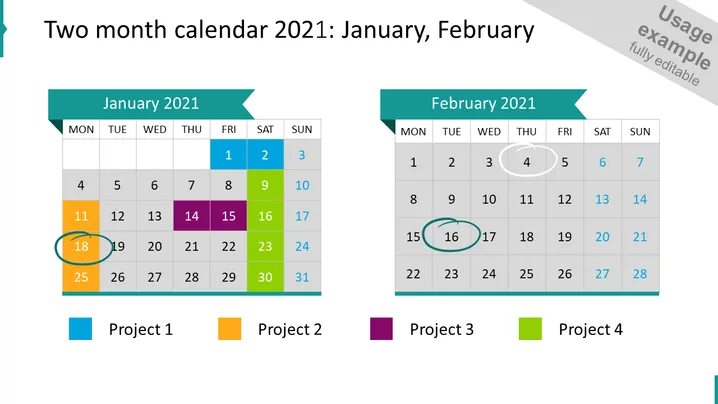
Two-month calendar 2021: January, February
Slide Content
The slide presents a two-month calendar for January and February 2021, with color-coded key dates for four different projects. Key dates for "Project 1" are marked in teal, "Project 2" in orange, "Project 3" in purple, and "Project 4" in green. Each month shows color-highlighted days and circled dates, indicating the importance or milestones related to the individual projects. This visualization helps in tracking project timelines, deadlines, or important events across two months.
Graphical Look
- Two large, clear calendar grids for January and February displayed side by side.
- Each calendar has a header with the month's name and year in a dark teal banner.
- Days of the week headers are at the top of each calendar, with the weekend days (Sunday and Saturday) in lighter shades.
- Certain dates on the calendars are highlighted with colored boxes corresponding to different projects.
- Circular outlines are drawn around specific dates, possibly to indicate major events or milestones.
- Below the calendars, four colored squares serve as a legend, matching the colors used to highlight the dates.
- The colors used in the legend squares are teal, orange, purple, and green; each is labeled with 'Project' followed by a number (1-4).
The slide is colorful with a professional and clean design. The use of colors and circles creates an easy-to-digest visual hierarchy that can quickly convey the project timelines.
Use Cases
- Planning and tracking project timelines during presentations to ensure that team members are aware of important dates and deadlines.
- Sharing schedules and deadlines with clients or stakeholders to align expectations and track progress.
- Using in a workshop or meeting to collaboratively discuss and plan project phases and milestones.
- Reviewing past project performance by highlighting key dates and milestones achieved in the given months.
How to Edit
How to edit text & colors

How to expand / shorten diagram

How to Replace Icons in infoDiagram PPT


