
Reviews
Ihre Grafiken verleihen meinen Präsentationen eine nette Note, und ich habe sie kürzlich für eines meiner All-Hands-Meetings verwendet. Ihre Toolbox verleiht meinen Folien Professionalität, anstatt Standard-Clipart zu verwenden.
Ich brauchte einen neuen Blick auf einige meiner Folien. Ich habe versucht, einen Weg zu finden, einen Pinselschlag-Effekt zu erzielen, um zu unterstreichen, hervorzuheben, Farbe hinzuzufügen, und die handgeschriebenen Markierungen waren genau das Richtige. Sehr einfach zu bedienen, leicht in der Größe zu ändern, die Farbe zu ändern. Es war eine erschwingliche, perfekte Lösung und ich empfehle sie gerne weiter.
Die klare, saubere Optik der Grafiken und die Tatsache, dass ich die Farben leicht bearbeiten und an die Vorlage anpassen konnte, war mein Hauptgrund für den Kauf.
Description
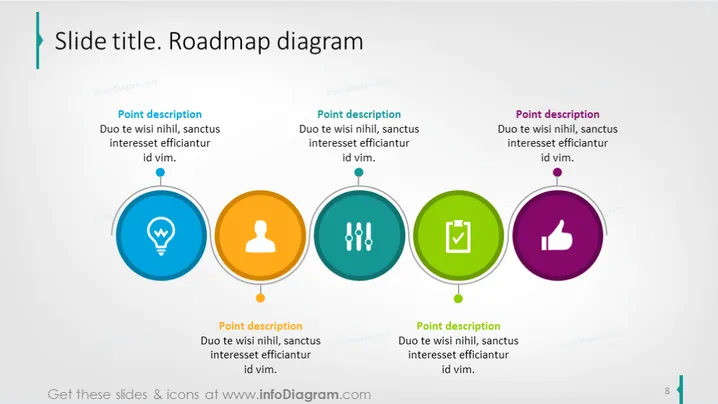
Slide title. Roadmap diagram
Slide Content
This slide presents a roadmap diagram with a sequence of four milestones, each detailed with a short description underneath it. The first milestone's description talks about commitment and attention with the use of a lightbulb icon, implying innovation or ideas. The second milestone's description paired with a user icon may represent customer focus or individual contribution. The third is linked with double check-mark icons, suggesting a validation or completion step. The final milestone uses a thumbs-up icon, which typically symbolizes approval or success.
Graphical Look
- The slide background is a clean white.
- There's a large teal and blue banner on the top with the slide title.
- Four colorful circular nodes are arranged in a horizontal sequence, representing the roadmap's milestones.
- Each node contains a unique icon:
- A lightbulb in blue for the first node.
- A user silhouette in orange for the second node.
- Double check-marks in teal for the third node.
- A thumbs-up in purple for the fourth node.
- The nodes are connected by a grey line that implies the progression of steps in the roadmap.
- Under each node is a text box for the description, with a heading 'Point description' followed by placeholder text.
- A thin grey line connects each description box to its corresponding node.
The slide has a balanced and colorful layout with a clear progression from left to right, which visually guides the viewer through the roadmap. The use of icons within the colored nodes provides a quick visual reference for each step.
Use Cases
- Presenting a project timeline, highlighting key milestones and deliverables.
- Explaining a product development process in a step-by-step sequence.
- Visualizing a strategic plan, outlining the stages of business growth or change.
- Demonstrating a workflow, process improvement, or innovation roadmap in a corporate presentation.
How to Edit
How to edit text & colors

How to expand / shorten diagram

How to Replace Icons in infoDiagram PPT


