
Reviews
Sus gráficos añaden un toque agradable a mis presentaciones y recientemente los usé para una de mis reuniones generales. Su conjunto de herramientas añade profesionalismo a mis diapositivas. En lugar de usar imágenes prediseñadas estándar.
Necesitaba un aspecto fresco para algunas de mis diapositivas. Había intentado encontrar una forma de crear un efecto de pincel, de subrayar, acentuar, añadir algo de color y los marcadores escritos a mano fueron justo lo que necesitaba. Muy fácil de usar, fácil de ajustar el tamaño, cambiar el color. Fue una solución asequible y perfecta, y estoy feliz de recomendarla.
El aspecto nítido y limpio de los gráficos, y el hecho de que me permitiera editar y cambiar fácilmente los colores para que coincidieran con la plantilla fue mi principal razón para comprarlos.
Description
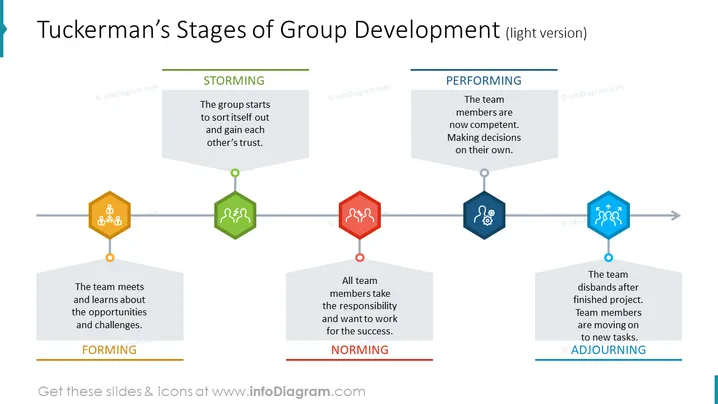
Tuckerman’s Stages of Group Development (light version)
Slide Content
The PowerPoint slide outlines Tuckerman's Stages of Group Development, with four key stages depicted. The first stage is "FORMING," where the team meets and learns about the opportunities and challenges, establishing the group's foundation. The second stage, "STORMING," sees the group starting to sort itself out and gaining trust among members, typically characterized by conflict and competition. The "NORMING" stage occurs when all team members take responsibility and work towards the group's success, indicating progress and cohesion. Lastly, the "PERFORMING" stage is when the team becomes competent, with members making decisions independently and the team functioning effectively. An additional stage, "ADJOURNING," represents the team disbanding after the project is finished and members moving on to new tasks, thus closing the group's lifecycle.
Graphical Look
- The slide has a light blue band on the top with the title in dark blue text.
- Each stage of development is symbolized by a hexagonal icon with a symbol in the center, connected by a horizontal line.
- Icons are colored differently - yellow for "FORMING," green for "STORMING," red for "NORMING," and dark blue for "PERFORMING."
- Below each hexagon, the stage's name is noted in bold with a colored line matching the icon above it.
- Each stage has its own description field in the form of a gray parallelogram with rounded angles.
- There is an additional pentagon-shaped icon in light blue for the "ADJOURNING" stage on the right.
- A horizontal arrow traverses the slide, pointing from left to right, indicating progression through stages.
The slide has a clean and professional appearance with a structured layout that guides the viewer's eyes from left to right. The use of color coding and geometric shapes provides an easy-to-follow visual representation of the group development process.
Use Cases
- Presenting team development strategies in management training or organizational development workshops.
- Explaining group dynamics and stages of team collaboration during onboarding processes for new employees.
- Utilizing the slide to assess current team stage and discuss strategies for moving forward during team building sessions.
- Illustrating academic concepts in psychology or business classes when discussing theories of group development.
How to Edit
How to edit text & colors

How to expand / shorten diagram

How to Replace Icons in infoDiagram PPT


