
Reviews
Your graphics add a nice touch to my presentations and I recently used them for one of my all-hands meetings. Your toolbox adds professionalism to my slides. Instead of using standard clipart.
I needed a fresh look at some of my slides. I've tried to find a way to create a paintbrush effect, to underline, accentuate, add some color and the handwritten markers were just the things. Very easy to use, easy to size, change the color. It was an affordable, perfect solution and I'm happy to recommend it.
The crisp, clean look of the graphics, and the fact that it allowed me to easily edit and change the colors to match the template was my main reason for purchasing them.
Description
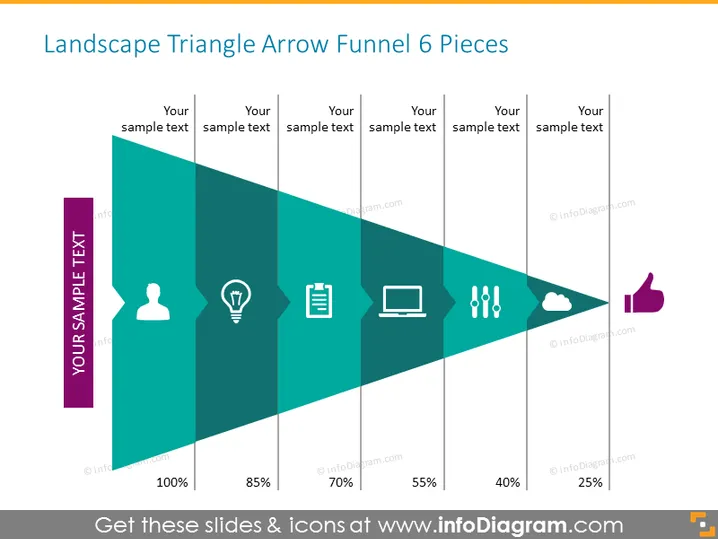
Landscape Triangle Arrow Funnel 6 Pieces
Slide Content
The slide presents a conceptual landscape triangle arrow funnel with six segments, each accompanied by a different icon and placeholder for sample text, indicating a step-by-step reduction or filtering process. The percentages reducing from 100% to 25% suggest a quantitative measure of progression through stages or rates of conversion, with each step potentially representing a phase in a process such as sales, engagement, or selection. Each of the icons can represent a different aspect or consideration at each stage of the funnel process.
Graphical Look
- A large, rightward-pointing triangle, segmented into six decreasing-width sections, creates a funnel shape.
- Each section contains a unique icon: a user, a light bulb, a clipboard, a laptop, exclamation marks, and a cloud.
- The first section starts with 100%, and each subsequent segment decrements in percentages: 85%, 70%, 55%, 40%, 25%.
- A vertical thumbs-up icon is placed adjacent to the last segment.
- To the left of the triangle, there is a vertical banner with rotated text labeled "YOUR SAMPLE TEXT".
- Each section’s division has an accompanying text box aligned horizontally above the triangle, labeled "Your sample text".
The design uses a teal gradient, giving the graphic depth and a sense of progression. White icons and text contrast sharply against this background, making the information easy to read.
Use Cases
- Illustrating the stages of a sales funnel in a business presentation.
- Representing applicant filtering in a recruitment process.
- Depicting customer journey stages from awareness to purchase.
- Displaying data or process flow in educational materials or training sessions.
How to Edit
How to edit text & colors

How to expand / shorten diagram

How to Replace Icons in infoDiagram PPT


