

Your graphics add a nice touch to my presentations and I recently used them for one of my all-hands meetings. Your toolbox adds professionalism to my slides. Instead of using standard clipart.
Claude Jones, Director of Engineer, @Walmartlabs, USA

Your graphics add a nice touch to my presentations and I recently used them for one of my all-hands meetings. Your toolbox adds professionalism to my slides. Instead of using standard clipart.
Claude Jones, Director of Engineer, @Walmartlabs, USA
I needed a fresh look at some of my slides. I've tried to find a way to create a paintbrush effect, to underline, accentuate, add some color and the handwritten markers were just the things. Very easy to use, easy to size, change the color. It was an affordable, perfect solution and I'm happy to recommend it.
Anonymous, US
The crisp, clean look of the graphics, and the fact that it allowed me to easily edit and change the colors to match the template was my main reason for purchasing them.
Brandie Jenkins, E-learning Developer, USA
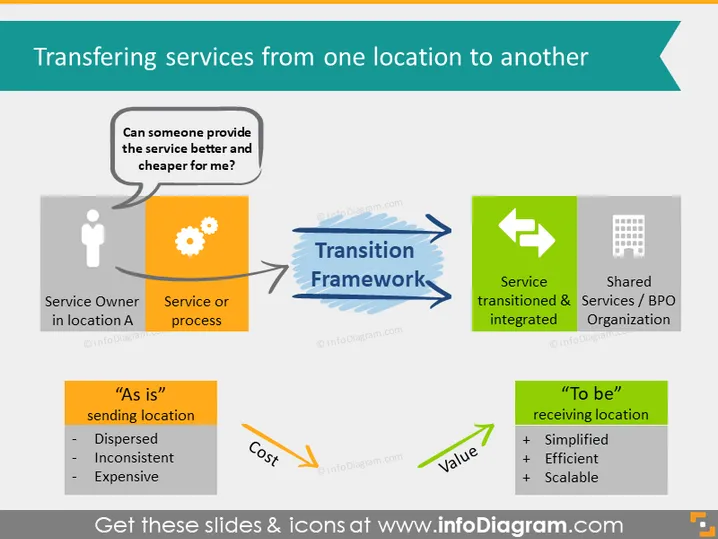
This PowerPoint slide is focused on the process of transferring services from one location to another, employing a Transition Framework to achieve the integration of service in a new location, potentially with a Shared Services/BPO Organization. The slide poses the central question, "Can someone provide the service better and cheaper for me?" to trigger the evaluation of service transfer. On one side, the "As is" sending location is characterized by being Dispersed, Inconsistent, and Expensive, signifying inefficiency. The transition leads to the "To be" receiving location, which promises Simplified, Efficient, and Scalable operations, suggesting improved performance and value outcome.
The slide is structured in a balanced manner with clear delineation between the current and desired states of service locations. The use of icons helps in visually distinguishing different elements and their progression through the transition.



