
Reviews
Ihre Grafiken verleihen meinen Präsentationen eine nette Note, und ich habe sie kürzlich für eines meiner All-Hands-Meetings verwendet. Ihre Toolbox verleiht meinen Folien Professionalität, anstatt Standard-Clipart zu verwenden.
Ich brauchte einen neuen Blick auf einige meiner Folien. Ich habe versucht, einen Weg zu finden, einen Pinselschlag-Effekt zu erzielen, um zu unterstreichen, hervorzuheben, Farbe hinzuzufügen, und die handgeschriebenen Markierungen waren genau das Richtige. Sehr einfach zu bedienen, leicht in der Größe zu ändern, die Farbe zu ändern. Es war eine erschwingliche, perfekte Lösung und ich empfehle sie gerne weiter.
Die klare, saubere Optik der Grafiken und die Tatsache, dass ich die Farben leicht bearbeiten und an die Vorlage anpassen konnte, war mein Hauptgrund für den Kauf.
Description
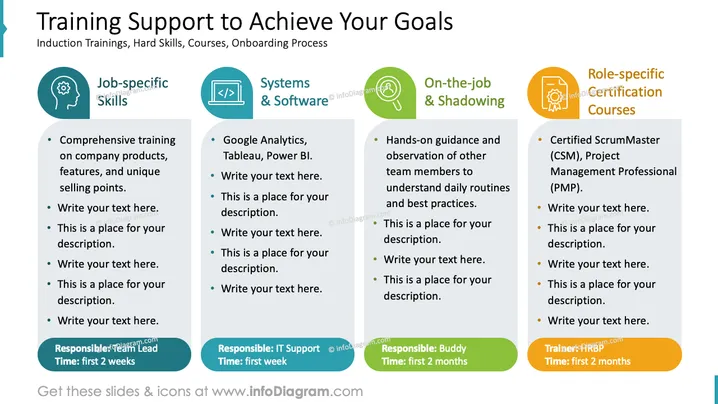
Training Support to Achieve Your Goals
Slide Content
The slide is about "Training Support to Achieve Your Goals," encompassing various areas of workplace learning. It outlines four key components: Job-specific Skills, Systems & Software, On-the-job & Shadowing, and Role-specific Certification Courses. For each component, it offers a placeholder for a description or relevant points. Job-specific Skills focus on comprehensive training about company products and unique selling points. Systems & Software mention tools like Google Analytics, Tableau, and Power BI. On-the-job & Shadowing implies hands-on guidance and learning daily routines from observing team members. Lastly, Role-specific Certification Courses could include certifications like Certified ScrumMaster (CSM) or Project Management Professional (PMP).
Graphical Look
- The slide has a wide format with a clean, professional aesthetic.
- A bold title in capital letters is at the top of the slide, with a subtitle underneath in smaller text.
- Four horizontal blocks are color-coded and aligned centrally.
- Each block contains an icon representative of its theme (a gear for Job-specific Skills, code brackets for Systems & Software, a circle-and-arrow for On-the-job & Shadowing, and a badge for Role-specific Certification Courses).
- Bullet points are presented within each block, with placeholder text.
- Each block has a footer area with a green accent color indicating the responsible role and timeframe for the training aspect highlighted in the respective block.
The slide uses a harmonious color scheme and clear, simple icons to convey its message. The layout is symmetrical and conveys a sense of organization and structure.
Use Cases
- In a human resources or departmental meeting to present training strategies and plans.
- During onboarding sessions to introduce new hires to the training support available.
- In management presentations to discuss and optimize the training process and resources.
- For professional development workshops to showcase continuous learning opportunities and career growth paths.
How to Edit
How to edit text & colors

How to expand / shorten diagram

How to Replace Icons in infoDiagram PPT


