
Reviews
Sus gráficos añaden un toque agradable a mis presentaciones y recientemente los usé para una de mis reuniones generales. Su conjunto de herramientas añade profesionalismo a mis diapositivas. En lugar de usar imágenes prediseñadas estándar.
Necesitaba un aspecto fresco para algunas de mis diapositivas. Había intentado encontrar una forma de crear un efecto de pincel, de subrayar, acentuar, añadir algo de color y los marcadores escritos a mano fueron justo lo que necesitaba. Muy fácil de usar, fácil de ajustar el tamaño, cambiar el color. Fue una solución asequible y perfecta, y estoy feliz de recomendarla.
El aspecto nítido y limpio de los gráficos, y el hecho de que me permitiera editar y cambiar fácilmente los colores para que coincidieran con la plantilla fue mi principal razón para comprarlos.
Description
Top Business Customers Comparison Analysis Template
Slide Content
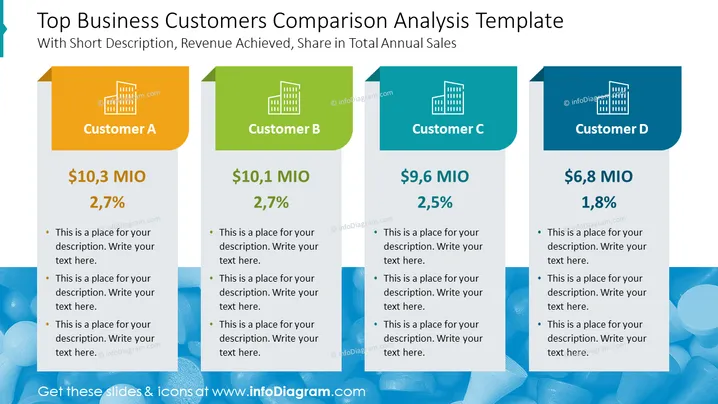
The PowerPoint slide titled "Top Business Customers Comparison Analysis Template" presents a comparative analysis of top customers with respect to revenue and proportion of total annual sales. Four separate blocks labeled Customer A, Customer B, Customer C, and Customer D display their respective revenue figures and sales percentages. Each block provides bullet points for additional descriptions, helping the audience understand how each customer contributes to the business's overall sales.
Graphical Look
- The slide background is white with a grayish-blue banner on top.
- Four colorful rectangular columns represent individual customers, with each column divided into three sections.
- The top section of each column showcases the customer's designation (A, B, C, D) against a building icon, with distinct colors for each (orange, green, blue, and dark blue).
- The middle section displays the revenue in 'MIO' followed by a percentage, emphasizing the customer's contribution to total sales.
- The bottom section contains placeholder text for a description, with bullet points for detailed explanations.
- All text is in bold, sans-serif font ensuring readability.
The overall look of the slide is clean and modern, with a clear differentiation between segments through the use of color. The layout supports easy comparison and quick understanding between the customer's categories and their data points.
Use Cases
- Present quarterly or annual sales figures to stakeholders demonstrating the contribution of each key customer.
- Use in strategy meetings to focus on customer revenue impact and discuss customer relationship management.
- Compare performance metrics during a sales team briefing to highlight targets and accomplishments with top customers.
- Incorporate into investor presentations for a visual representation of customer portfolio distribution and its direct influence on revenue.
How to Edit
How to edit text & colors

How to expand / shorten diagram

How to Replace Icons in infoDiagram PPT


