
Reviews
Your graphics add a nice touch to my presentations and I recently used them for one of my all-hands meetings. Your toolbox adds professionalism to my slides. Instead of using standard clipart.
I needed a fresh look at some of my slides. I've tried to find a way to create a paintbrush effect, to underline, accentuate, add some color and the handwritten markers were just the things. Very easy to use, easy to size, change the color. It was an affordable, perfect solution and I'm happy to recommend it.
The crisp, clean look of the graphics, and the fact that it allowed me to easily edit and change the colors to match the template was my main reason for purchasing them.
Description
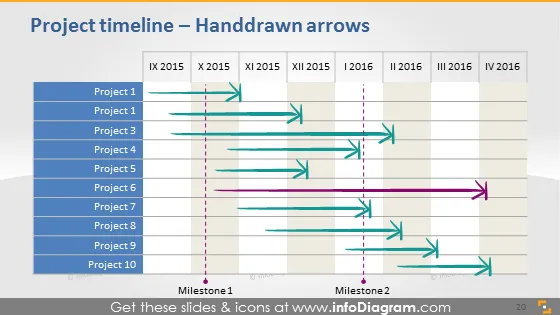
Project timeline – Handdrawn arrows
Slide Content
The slide presents a project timeline using handdrawn arrow graphics to depict the span and progress of ten different projects over a time period from IX 2015 to IV 2016. Two key milestones are marked on the timeline, indicating significant events or goals. Each project is represented by a horizontal colored bar and an arrow with its length varying according to the project's duration. The distinctive drawing style of the arrows adds an informal or creative touch to the information being presented.
Graphical Look
- A timeline with a horizontal orientation spans across the middle of the slide.
- Colored horizontal bars represent different projects, each labeled as "Project 1" through "Project 10."
- Handdrawn-style arrows extend from the start to the end of each project's duration.
- Two milestone markers are positioned below the timeline, labeled "Milestone1" and "Milestone2."
- Vertical dashed lines indicate different quarters from IX 2015 to IV 2016.
- A 3-dimensional effect is presented on the left side, suggesting depth to the timeline.
The overall look of the slide is professional with a creative flair due to the handdrawn arrows. The color coding and layout make it easy to visualize the duration and overlap between projects.
Use Cases
- To illustrate project planning and progress in project management meetings.
- To show the timeline of multiple projects to stakeholders during progress update presentations.
- To highlight critical milestones and their placement within the overall project schedule.
- In workshops or training sessions to explain the concept of timeline and resource allocation in project management.
How to Edit
How to edit text & colors

How to expand / shorten diagram

How to Replace Icons in infoDiagram PPT


