

Your graphics add a nice touch to my presentations and I recently used them for one of my all-hands meetings. Your toolbox adds professionalism to my slides. Instead of using standard clipart.
Claude Jones, Director of Engineer, @Walmartlabs, USA

Your graphics add a nice touch to my presentations and I recently used them for one of my all-hands meetings. Your toolbox adds professionalism to my slides. Instead of using standard clipart.
Claude Jones, Director of Engineer, @Walmartlabs, USA
I needed a fresh look at some of my slides. I've tried to find a way to create a paintbrush effect, to underline, accentuate, add some color and the handwritten markers were just the things. Very easy to use, easy to size, change the color. It was an affordable, perfect solution and I'm happy to recommend it.
Anonymous, US
The crisp, clean look of the graphics, and the fact that it allowed me to easily edit and change the colors to match the template was my main reason for purchasing them.
Brandie Jenkins, E-learning Developer, USA
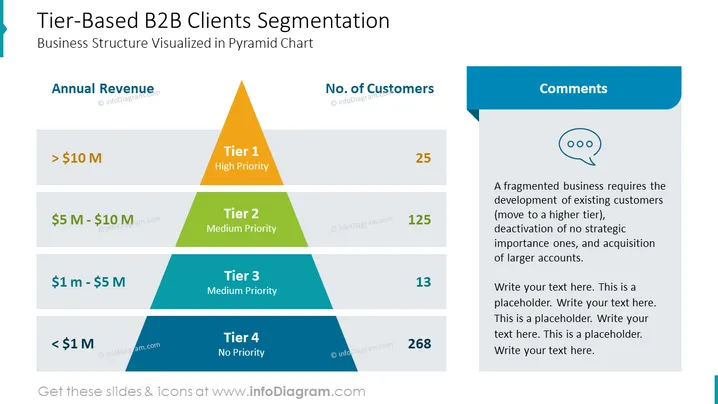
The slide presents a tier-based segmentation model for B2B clients, depicted in a pyramid chart that illustrates the business structure. Tier 1 represents clients with an annual revenue of more than $10 million and is considered high priority with 25 customers. Tier 2 denotes medium priority clients generating between $5 million and $10 million in revenue and includes 125 customers. Tier 3, also medium priority, encompasses businesses earning $1 million to $5 million with 13 customers. The lowest tier, Tier 4, indicates no priority clients with revenue below $1 million, counting 268 customers. Beside the pyramid is a "Comments" section suggesting strategies such as developing existing customers, deactivating non-strategic accounts, and acquiring larger accounts.
The slide's graphical elements are well organized, with a clean, modern look that is easy-to-read and aesthetically pleasing.



