

Your graphics add a nice touch to my presentations and I recently used them for one of my all-hands meetings. Your toolbox adds professionalism to my slides. Instead of using standard clipart.
Claude Jones, Director of Engineer, @Walmartlabs, USA

Your graphics add a nice touch to my presentations and I recently used them for one of my all-hands meetings. Your toolbox adds professionalism to my slides. Instead of using standard clipart.
Claude Jones, Director of Engineer, @Walmartlabs, USA
I needed a fresh look at some of my slides. I've tried to find a way to create a paintbrush effect, to underline, accentuate, add some color and the handwritten markers were just the things. Very easy to use, easy to size, change the color. It was an affordable, perfect solution and I'm happy to recommend it.
Anonymous, US
The crisp, clean look of the graphics, and the fact that it allowed me to easily edit and change the colors to match the template was my main reason for purchasing them.
Brandie Jenkins, E-learning Developer, USA
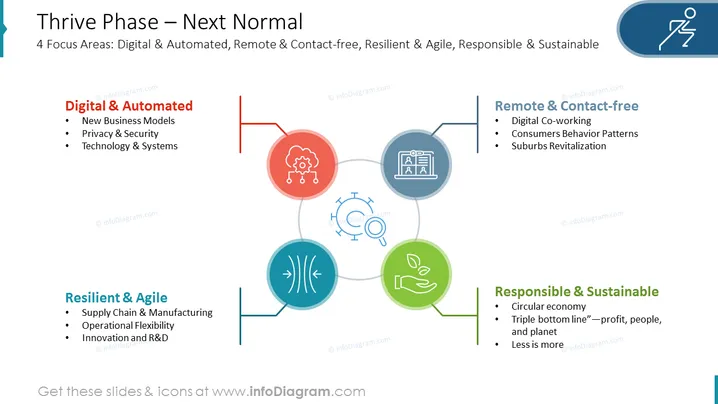
The PowerPoint slide titled "Thrive Phase – Next Normal" outlines four focus areas essential for thriving in the new normal: Digital & Automated, Remote & Contact-free, Resilient & Agile, and Responsible & Sustainable. Each focus area has three sub-points. "Digital & Automated" refers to embracing new business models, ensuring privacy & security, and enhancing technology & systems. "Remote & Contact-free" highlights the shift towards digital co-working, changing consumer behavior patterns, and the revitalization of suburbs. "Resilient & Agile" emphasizes the importance of a robust supply chain & manufacturing sector, operational flexibility, and innovation and R&D for businesses to adapt quickly. Lastly, "Responsible & Sustainable" discusses adopting a circular economy, adhering to the triple bottom line approach focused on profit, people, and the planet, and embracing the concept of 'less is more'.
The overall look of the slide is professional and modern, employing a color-coded system to distinctively represent each focus area. The flat icons and clean typography contribute to a straightforward and easily comprehendible layout.



