
Reviews
Vos graphiques ajoutent une belle touche à mes présentations et je les ai récemment utilisés pour l'une de mes réunions générales. Votre boîte à outils ajoute du professionnalisme à mes diapositives. Au lieu d'utiliser des cliparts standards.
J'avais besoin d'un nouveau regard sur certaines de mes diapositives. J'ai essayé de trouver un moyen de créer un effet de pinceau, de souligner, d'accentuer, d'ajouter de la couleur et les marqueurs manuscrits étaient exactement ce qu'il fallait. Très facile à utiliser, facile à ajuster la taille, à changer la couleur. C'était une solution abordable et parfaite et je suis heureux de la recommander.
L'aspect net et épuré des graphiques, et le fait qu'il m'ait permis d'éditer et de changer facilement les couleurs pour les adapter au modèle, ont été les principales raisons de mon achat.
Description
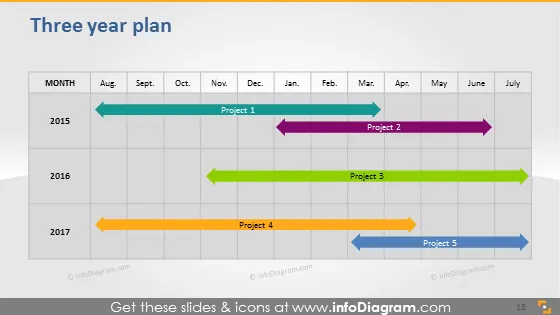
Three year plan
Slide Content
This slide shows a timeline named "Three year plan" indicating the schedule of five different projects over a three-year period, from 2015 to 2017. Each year has its row with months listed from August to July, and colored arrows represent the span of each project. The timeline presents a visual representation for project duration, helping to easily see overlaps and individual project timelines.
Graphical Look
- The slide has a white background with a prominent title at the top in dark text.
- Just below the title, there's a grid that serves as the timeline, with columns representing months and rows representing years.
- The project timelines are shown using arrows with various colors and lengths, indicating the start and end of each project.
- Each project is labeled with a "Project" followed by a number (from 1 to 5).
- The months are abbreviated and displayed in a row above the timeline.
- The years are shown to the left of each corresponding row in the grid.
- There's a page number "18" displayed at the bottom right corner on a dark strip.
The slide is clear and visually easy to interpret, using contrasting colors for the project arrows against a subtle grid of months and years. The design is professional and suitable for business presentations.
Use Cases
- Presenting project management timelines and schedules in business meetings.
- Illustrating the planning phase of major initiatives during strategy sessions.
- Communicating the overlap and sequence of projects to team members or stakeholders.
- Using in workshops or seminars to teach concepts of timeline management and strategic planning.
How to Edit
How to edit text & colors

How to expand / shorten diagram

How to Replace Icons in infoDiagram PPT


