
Reviews
Your graphics add a nice touch to my presentations and I recently used them for one of my all-hands meetings. Your toolbox adds professionalism to my slides. Instead of using standard clipart.
I needed a fresh look at some of my slides. I've tried to find a way to create a paintbrush effect, to underline, accentuate, add some color and the handwritten markers were just the things. Very easy to use, easy to size, change the color. It was an affordable, perfect solution and I'm happy to recommend it.
The crisp, clean look of the graphics, and the fact that it allowed me to easily edit and change the colors to match the template was my main reason for purchasing them.
Description
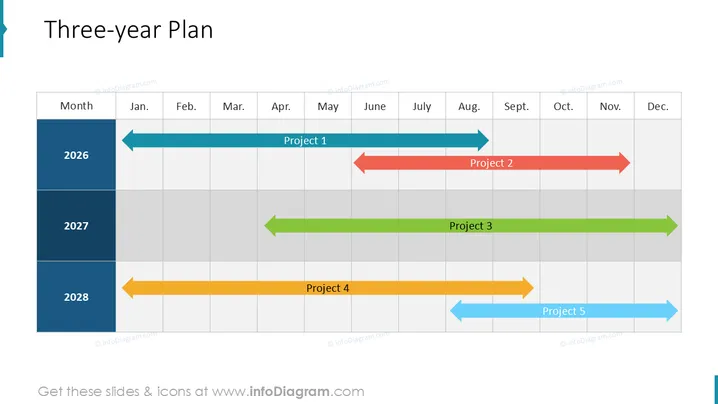
Three-year Plan
Slide Content
The slide presents a "Three-year Plan" showcasing a timeline across three distinct years, 2025, 2026, and 2027. Each year displays a horizontal time bar subdivided by months, indicating the start and finish of various projects. There are five projects represented by colored arrows pointing right, signifying their duration and sequence. "Project 1" spans a significant part of 2025, while "Project 2" begins in the latter half of 2025 and extends into 2026. "Project 3" is set entirely within 2026. "Project 4" commences toward the end of 2026 and overlaps with "Project 5," which starts in 2027.
Graphical Look
- The slide has a clear and structured layout with a grid depicting months and years.
- The title "Three-year Plan" is prominently positioned at the top center in large, bold font.
- A vertical column on the left side lists the years 2025, 2026, and 2027, color-coordinated to match the project timeline bars.
- Horizontal rows are marked with abbreviated month names from January to December, forming a matrix with the year column.
- Each project is represented by a uniquely colored directional arrow bar, with the project name superimposed.
- The directional arrows on the bars include triangular arrowheads, pointing to the right, indicating the timeline direction and project progression.
- The color palette throughout the slide is vibrant and diverse, with each project having a distinct hue for easy differentiation.
The slide has a professional and clean design, with a good balance of text and graphical elements. The use of color-coding and arrow bars makes it easy to interpret the project timelines at a glance.
Use Cases
- To present strategic plans in corporate meetings, giving stakeholders a clear view of the project timelines.
- For project management purposes, allowing teams to visualize the sequence and overlap of multiple project timelines.
- In annual general meetings to provide a summary of upcoming initiatives to shareholders.
- During employee onboarding or team briefings to align everyone with the company's goals and schedule for the coming years.
How to Edit
How to edit text & colors

How to expand / shorten diagram

How to Replace Icons in infoDiagram PPT


