
Reviews
Ihre Grafiken verleihen meinen Präsentationen eine nette Note, und ich habe sie kürzlich für eines meiner All-Hands-Meetings verwendet. Ihre Toolbox verleiht meinen Folien Professionalität, anstatt Standard-Clipart zu verwenden.
Ich brauchte einen neuen Blick auf einige meiner Folien. Ich habe versucht, einen Weg zu finden, einen Pinselschlag-Effekt zu erzielen, um zu unterstreichen, hervorzuheben, Farbe hinzuzufügen, und die handgeschriebenen Markierungen waren genau das Richtige. Sehr einfach zu bedienen, leicht in der Größe zu ändern, die Farbe zu ändern. Es war eine erschwingliche, perfekte Lösung und ich empfehle sie gerne weiter.
Die klare, saubere Optik der Grafiken und die Tatsache, dass ich die Farben leicht bearbeiten und an die Vorlage anpassen konnte, war mein Hauptgrund für den Kauf.
Description
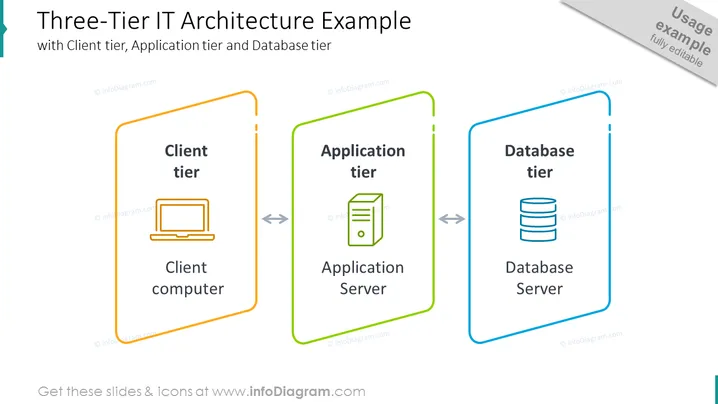
Three-Tier IT Architecture Example
Slide Content
The slide presents the concept of a "Three-Tier IT Architecture," which typically entails a Client tier, Application tier, and Database tier. The Client tier is marked by the icon of a desktop computer, implying the user interface layer where users interact. The Application tier has an icon representing an application server, indicating the logic layer where data processing happens. Finally, the Database tier shows a stacked database symbol, reflecting the data storage layer where data is managed and stored securely.
Graphical Look
- The slide has a clean, contemporary design with a white background and three vertical blocks representing each tier.
- Each block has a different color outline: orange for Client tier, green for Application tier, and blue for Database tier, with a slight gradient effect.
- Inside each colored block, there's a representative icon matching the theme: a desktop computer, server, and database images.
- The blocks contain labels for each tier, and there are curved, bidirectional arrows between the tiers, suggesting interaction.
- The title is at the top in a large, bold font, with a subtitle in a smaller font size directly underneath.
- The slide has a dark text and icons, providing a stark contrast against the white background and colored outlines.
The overall look of the slide is minimalistic and informative, with a clear distinction between the layers of IT architecture. The use of color and icons makes the information approachable and easy to digest.
Use Cases
- For educating stakeholders or team members about basic IT architecture during internal training sessions.
- In sales or consulting presentations to explain the technical setup of a product or service.
- To visualize system architecture in project planning or documentation.
- As a guideline during architecture review meetings to discuss potential improvements or changes.
How to Edit
How to edit text & colors

How to expand / shorten diagram

How to Replace Icons in infoDiagram PPT


