
Reviews
Ihre Grafiken verleihen meinen Präsentationen eine nette Note, und ich habe sie kürzlich für eines meiner All-Hands-Meetings verwendet. Ihre Toolbox verleiht meinen Folien Professionalität, anstatt Standard-Clipart zu verwenden.
Ich brauchte einen neuen Blick auf einige meiner Folien. Ich habe versucht, einen Weg zu finden, einen Pinselschlag-Effekt zu erzielen, um zu unterstreichen, hervorzuheben, Farbe hinzuzufügen, und die handgeschriebenen Markierungen waren genau das Richtige. Sehr einfach zu bedienen, leicht in der Größe zu ändern, die Farbe zu ändern. Es war eine erschwingliche, perfekte Lösung und ich empfehle sie gerne weiter.
Die klare, saubere Optik der Grafiken und die Tatsache, dass ich die Farben leicht bearbeiten und an die Vorlage anpassen konnte, war mein Hauptgrund für den Kauf.
Description
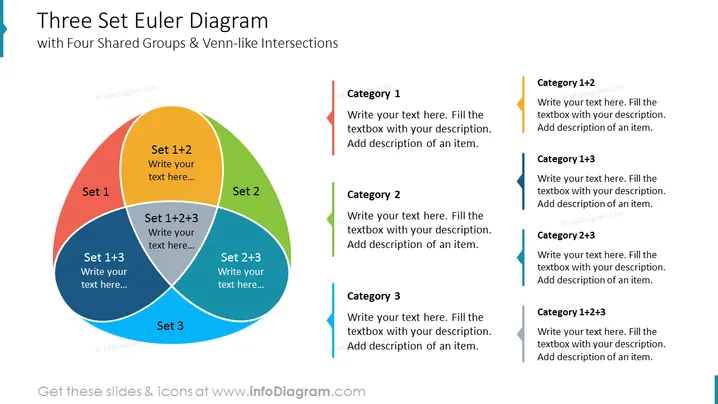
Three Set Euler Diagram
Slide Content
The slide presents a "Three Set Euler Diagram with Four Shared Groups & Venn-like Intersections." This diagram visually represents the relationships between three overlapping sets, indicating where they share common elements and where they are unique. It has sections for Set 1, Set 2, and Set 3, each with a distinct color. The intersections show areas where two sets overlap (Set 1+2, Set 1+3, Set 2+3) and where all three sets intersect (Set 1+2+3). Each section and intersection provides space for text, enabling the presenter to add specific descriptions and details for each category.
Graphical Look
- Three overlapping circles in red, green, and blue, create a central diagram.
- Each circle is labeled (Set 1, Set 2, Set 3) with additional labels for the overlapping areas, demonstrating the sets' intersections.
- Text placeholders on the diagram invite the user to input specific information for each set or intersection.
- To the right, colored sidebar indicators with arrows point to text boxes corresponding to each intersection or set.
- The text boxes to the right are aligned vertically, matching the colors of the sets and intersections they represent.
- Each text box contains placeholder text instructing users to write specific details for each category.
The slide is bright and color-coordinated, with a clean layout that makes it easy to understand the relationships between different categories or groups. The design is balanced, with the Euler diagram on the left and descriptive text boxes on the right, creating a visually appealing and informative display.
Use Cases
- Illustrating the shared characteristics or commonalities between different business units or project teams.
- Analyzing customer segments that overlap in terms of needs or behaviors.
- Displaying the results of a survey where multiple factors are considered and where respondents may belong to more than one category.
- Facilitating strategic planning by mapping out the intersections of different competencies, resources, or market opportunities.
How to Edit
How to edit text & colors

How to expand / shorten diagram

How to Replace Icons in infoDiagram PPT


