
Reviews
Ihre Grafiken verleihen meinen Präsentationen eine nette Note, und ich habe sie kürzlich für eines meiner All-Hands-Meetings verwendet. Ihre Toolbox verleiht meinen Folien Professionalität, anstatt Standard-Clipart zu verwenden.
Ich brauchte einen neuen Blick auf einige meiner Folien. Ich habe versucht, einen Weg zu finden, einen Pinselschlag-Effekt zu erzielen, um zu unterstreichen, hervorzuheben, Farbe hinzuzufügen, und die handgeschriebenen Markierungen waren genau das Richtige. Sehr einfach zu bedienen, leicht in der Größe zu ändern, die Farbe zu ändern. Es war eine erschwingliche, perfekte Lösung und ich empfehle sie gerne weiter.
Die klare, saubere Optik der Grafiken und die Tatsache, dass ich die Farben leicht bearbeiten und an die Vorlage anpassen konnte, war mein Hauptgrund für den Kauf.
Description
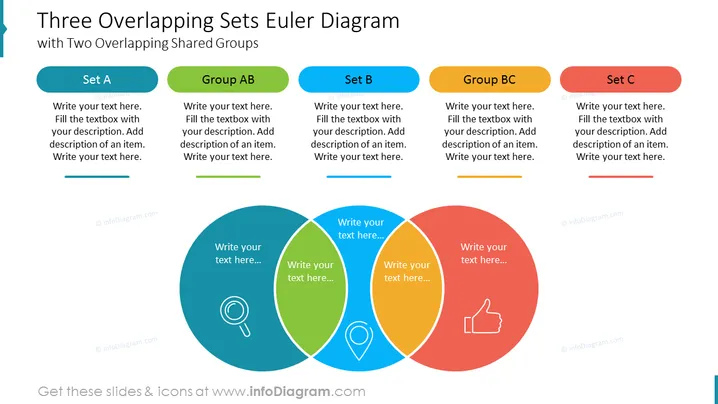
Three Overlapping Sets Euler Diagram with Two Overlapping Shared Groups
Slide Content
The PowerPoint slide titled "Three Overlapping Sets Euler Diagram with Two Overlapping Shared Groups" illustrates a concept through three interconnected circular shapes representing sets A, B, and C, and their overlapping areas labeled as groups AB and BC. "Set A" and "Set C" are singular entities, while "Group AB" and "Group BC" are intersections indicating shared elements between the sets. Each set and group section provides a space to write text, allowing for detailed descriptions and expansion on the particular traits or elements that belong to each category.
Graphical Look
- The slide features a prominent title in dark blue, large font at the top.
- Below the title, there are three flattened oval shapes resembling tabs, each correlating with a different set: Set A (teal), Set B (blue), and Set C (red).
- Each set tab is paired with a corresponding text box for descriptive content.
- The main graphic is comprised of three overlapping circles in teal, green, and orange, designed to represent the Euler diagram.
- Within the overlapping areas of the circles, there are additional spaces labeled as "Group AB" and "Group BC," also with paired text boxes.
- Icons are placed within the non-overlapping regions of the circles - a magnifying glass in the teal circle, a location pin in green, and a thumbs-up in orange.
The slide uses a clean, professional color scheme and is carefully organized to emphasize the relationships between different groups in a visually intuitive manner.
Use Cases
- Explaining complex relationships within a project team where certain members are part of multiple sub-teams.
- Presenting market segmentation where consumers may fall into overlapping categories based on their characteristics.
- Illustrating the intersections of skill sets within a cross-functional department or among different departments.
- Demonstrating customer overlap between different product lines in a business portfolio meeting.
How to Edit
How to edit text & colors

How to expand / shorten diagram

How to Replace Icons in infoDiagram PPT


