
Reviews
Your graphics add a nice touch to my presentations and I recently used them for one of my all-hands meetings. Your toolbox adds professionalism to my slides. Instead of using standard clipart.
I needed a fresh look at some of my slides. I've tried to find a way to create a paintbrush effect, to underline, accentuate, add some color and the handwritten markers were just the things. Very easy to use, easy to size, change the color. It was an affordable, perfect solution and I'm happy to recommend it.
The crisp, clean look of the graphics, and the fact that it allowed me to easily edit and change the colors to match the template was my main reason for purchasing them.
Description
The 3 Scopes of Carbon Emission
Slide Content
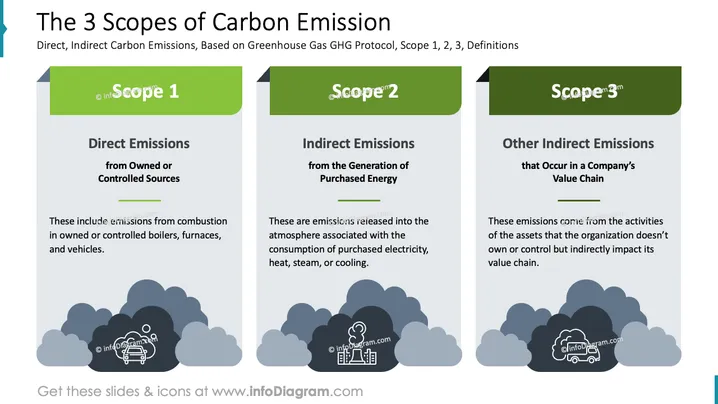
The slide details the three scopes of carbon emissions based on the Greenhouse Gas Protocol. Scope 1 involves direct emissions from owned or controlled sources, such as combustion in boilers or vehicles. Scope 2 covers indirect emissions from the generation of purchased energy, including electricity and heat. Scope 3 pertains to other indirect emissions occurring in a company's value chain, involving activities from assets not owned by the organization.
Graphical Look
- The slide is divided into three sections, each representing a scope.
- Each section has a green header with the scope number, adding color contrast.
- Text is presented in dark font on a light grey background for readability.
- Below the text in each section, there are cloud and icon graphics illustrating each scope:
- Scope 1: A boiler or vehicle icon.
- Scope 2: An electricity-related icon.
- Scope 3: A transportation-related icon.
- The layout is symmetrical and consistent, ensuring clarity and organization.
The overall slide is clean and structured, effectively using colors and icons to distinguish the three scopes of emission.
Use Cases
- Environmental impact assessment in corporate business strategies.
- Educational presentations on greenhouse gas protocols.
- Sustainability reporting and compliance discussions.
How to Edit
How to edit text & colors

How to expand / shorten diagram

How to Replace Icons in infoDiagram PPT


