
Reviews
Ihre Grafiken verleihen meinen Präsentationen eine nette Note, und ich habe sie kürzlich für eines meiner All-Hands-Meetings verwendet. Ihre Toolbox verleiht meinen Folien Professionalität, anstatt Standard-Clipart zu verwenden.
Ich brauchte einen neuen Blick auf einige meiner Folien. Ich habe versucht, einen Weg zu finden, einen Pinselschlag-Effekt zu erzielen, um zu unterstreichen, hervorzuheben, Farbe hinzuzufügen, und die handgeschriebenen Markierungen waren genau das Richtige. Sehr einfach zu bedienen, leicht in der Größe zu ändern, die Farbe zu ändern. Es war eine erschwingliche, perfekte Lösung und ich empfehle sie gerne weiter.
Die klare, saubere Optik der Grafiken und die Tatsache, dass ich die Farben leicht bearbeiten und an die Vorlage anpassen konnte, war mein Hauptgrund für den Kauf.
Description
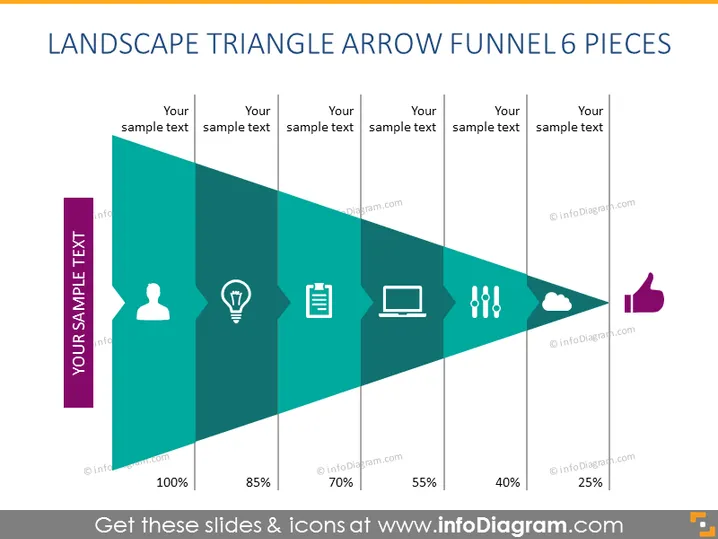
LANDSCAPE TRIANGLE ARROW FUNNEL 6 PIECES
Slide Content
The slide depicts a funnel-shaped progression using a landscape triangle arrow with 6 distinct segments, signifying different stages or metrics that decrease from 100% to 25%. Each piece of the triangle is associated with a different icon and place for sample text, potentially representing a process step or a quantifiable metric in a sequence. The icons suggest personal user data, creativity or innovation, documentation, technology, analysis or metrics, and customer satisfaction or approval.
Graphical Look
- A large right-angled triangle dominates the slide, intended to represent a funnel.
- This triangle is divided into six segments, narrowing down to the right, each with a different width to represent a proportional segment of a process or data set.
- Each segment is associated with an icon and percentage, starting from 100% and decreasing by increments (85%, 70%, 55%, 40%, 25%) as it moves right.
- Above the triangle, there are placeholders for text aligned with each segment.
- Icons within the segments include a human figure, light bulb, document, laptop, group of bars representing analytics, and a cloud with an exclamation mark implying alerts or issues.
- A thumbs up symbol marks the end of the funnel, suggesting an outcome or end goal.
- The color palette is primarily shades of teal, with the most significant section in dark teal, and each subsequent section is progressively lighter.
- The icons are white, creating a stark contrast against the teal background for ease of visibility.
The slide has a structured, professional look, incorporating a clear, visual representation of a stepped process or data flow. The use of percentage values and icons within the segments of the funnel assists in conveying a quantitative journey toward a final outcome or evaluation.
Use Cases
- To illustrate sales or marketing conversion rates at each stage of a customer journey.
- For showing the attrition of numbers in a process, like percent yield at each phase of manufacturing or project completion.
- To represent the filtering process in data analysis, highlighting how data sets are reduced through various criteria.
- In an educational setting, to explain concepts of percentage decrease, data set reduction, or sequential process steps in visual form.
How to Edit
How to edit text & colors

How to expand / shorten diagram

How to Replace Icons in infoDiagram PPT


