
Reviews
Ihre Grafiken verleihen meinen Präsentationen eine nette Note, und ich habe sie kürzlich für eines meiner All-Hands-Meetings verwendet. Ihre Toolbox verleiht meinen Folien Professionalität, anstatt Standard-Clipart zu verwenden.
Ich brauchte einen neuen Blick auf einige meiner Folien. Ich habe versucht, einen Weg zu finden, einen Pinselschlag-Effekt zu erzielen, um zu unterstreichen, hervorzuheben, Farbe hinzuzufügen, und die handgeschriebenen Markierungen waren genau das Richtige. Sehr einfach zu bedienen, leicht in der Größe zu ändern, die Farbe zu ändern. Es war eine erschwingliche, perfekte Lösung und ich empfehle sie gerne weiter.
Die klare, saubere Optik der Grafiken und die Tatsache, dass ich die Farben leicht bearbeiten und an die Vorlage anpassen konnte, war mein Hauptgrund für den Kauf.
Description
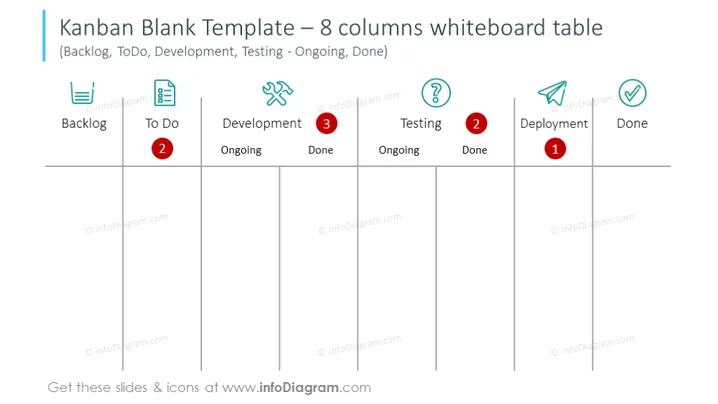
Kanban Blank Template – 8 columns whiteboard table
Slide Content
The slide presents a Kanban Blank Template which is used for task tracking and project management. It includes sections for Backlog, To Do, Development (with sub-columns for Ongoing and Done), Testing (Ongoing and Done), Deployment, and Done. The Kanban method helps in visualizing work, limiting work in progress, and maximizing efficiency. Each column has an icon representing its function: a backlog box, a checklist, tools, a question mark for testing, a rocket for deployment, and a checkmark for completed tasks. The 'To Do', 'Development', and 'Testing' sections have red numbered circles indicating task counts.
Graphical Look
- The title of the slide is in large, bold, dark blue font.
- The subtitle is in smaller, italicized dark blue font and enclosed in parentheses.
- There are eight vertical columns, each delineated by a thin grey line.
- Each column has a header with an icon and title in dark blue font.
- The icons are styled in shades of light blue and green.
- There is a red numbered circle on the 'To Do', 'Development', and 'Testing' columns.
- The 'Development' and 'Testing' stages are further divided into 'Ongoing' and 'Done' sub-columns, with respective headers in smaller, lighter blue font.
- The slide background is white, providing a clean and uncluttered visual space.
The overall look of the slide is clean, with a minimalist design that employs a cool color palette. The use of icons and color-coded numbered circles aids in quick comprehension of task statuses and workflow stages.
Use Cases
- For project management presentations to visualize the workflow and task progression.
- In team meetings to review current work status, identify bottlenecks, and distribute tasks.
- During workshops to teach the Kanban methodology to new team members or new teams.
- As part of performance and progress reports to stakeholders to demonstrate project advancement and resource allocation.
How to Edit
How to edit text & colors

How to expand / shorten diagram

How to Replace Icons in infoDiagram PPT


