
Reviews
Ihre Grafiken verleihen meinen Präsentationen eine nette Note, und ich habe sie kürzlich für eines meiner All-Hands-Meetings verwendet. Ihre Toolbox verleiht meinen Folien Professionalität, anstatt Standard-Clipart zu verwenden.
Ich brauchte einen neuen Blick auf einige meiner Folien. Ich habe versucht, einen Weg zu finden, einen Pinselschlag-Effekt zu erzielen, um zu unterstreichen, hervorzuheben, Farbe hinzuzufügen, und die handgeschriebenen Markierungen waren genau das Richtige. Sehr einfach zu bedienen, leicht in der Größe zu ändern, die Farbe zu ändern. Es war eine erschwingliche, perfekte Lösung und ich empfehle sie gerne weiter.
Die klare, saubere Optik der Grafiken und die Tatsache, dass ich die Farben leicht bearbeiten und an die Vorlage anpassen konnte, war mein Hauptgrund für den Kauf.
Description
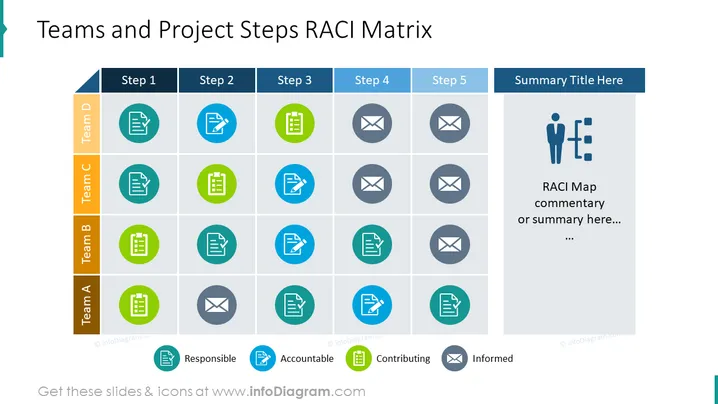
Teams and Project Steps RACI Matrix
Slide Content:
The slide displays a RACI Matrix that cross-references four teams (Team A to Team D) with five project steps to delineate responsibilities. Each cell contains an icon representing one of the RACI categories: Responsible, Accountable, Consulted, or Informed. The matrix is a project management tool used to specify roles and responsibilities, ensuring that all tasks are covered and that team members understand their duties at each project step.
Graphical Look:
- A table with rows labeled Team A to Team D and columns labeled Step 1 to Step 5.
- Icons in circles of different colors representing each RACI category, e.g.: clipboard for Responsible, checkmark for Accountable, group for Contributing, and envelope for Informed.
- A blue header for project steps and an orange header for team labels.
- A side panel in blue with space for a summary title and additional RACI map commentary.
- A human figure with a chart icon representing the concept of project management or RACI mapping.
The slide uses a clean and structured layout with color-coded icons to visually organize information. The distinct headers and side panels provide clarity and space for additional details.
Use Cases:
This slide would be suitable for project management meetings, team briefings, and workshops where the focus is on assigning clear roles and responsibilities for each step of a project. It can be used in both planning stages and throughout project execution to keep all team members informed of their tasks and the overall project progression.
How to Edit
How to edit text & colors

How to expand / shorten diagram

How to Replace Icons in infoDiagram PPT


