
Reviews
Ihre Grafiken verleihen meinen Präsentationen eine nette Note, und ich habe sie kürzlich für eines meiner All-Hands-Meetings verwendet. Ihre Toolbox verleiht meinen Folien Professionalität, anstatt Standard-Clipart zu verwenden.
Ich brauchte einen neuen Blick auf einige meiner Folien. Ich habe versucht, einen Weg zu finden, einen Pinselschlag-Effekt zu erzielen, um zu unterstreichen, hervorzuheben, Farbe hinzuzufügen, und die handgeschriebenen Markierungen waren genau das Richtige. Sehr einfach zu bedienen, leicht in der Größe zu ändern, die Farbe zu ändern. Es war eine erschwingliche, perfekte Lösung und ich empfehle sie gerne weiter.
Die klare, saubere Optik der Grafiken und die Tatsache, dass ich die Farben leicht bearbeiten und an die Vorlage anpassen konnte, war mein Hauptgrund für den Kauf.
Description
Norming Stage of Team Development Dynamics
Slide Content
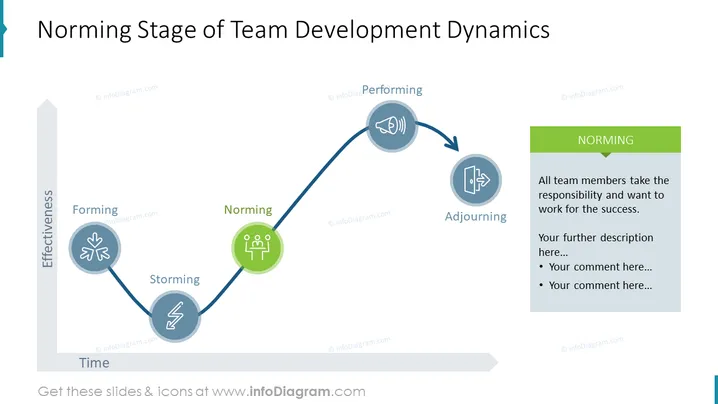
This PowerPoint slide presents the Norming stage in the context of team development dynamics, part of a larger model of team evolution over time. The slide outlines the progression from Forming, characterized by team orientation, to Storming, where conflicts may arise, towards Norming where harmony and productivity begin to emerge, then to Performing where the team is at peak effectiveness, and finally to Adjourning, signifying the conclusion of the team's tasks. The Norming phase is highlighted with an explanation that all team members take responsibility and work for success, further descriptions and comments are prompted.
Graphical Look
- The slide's background is plain white which gives a clean and professional look.
- A horizontal two-dimensional graph is portrayed, with 'Effectiveness' on the vertical axis and 'Time' on the horizontal axis.
- There are five circular nodes connected by a sine-wave-like curved line, suggesting a dynamic process with ups and downs.
- Each node represents a stage in team development and includes an icon: handshake (Forming), lightning bolt (Storming), three figures (Norming), loudspeaker (Performing), and door (Adjourning).
- The Norming stage is highlighted with a green circle and has a corresponding green sidebar with bullet points for additional text.
- Icons are simple and uniform in style, contributing to an overall cohesive and illustrative appearance.
The graphical elements are balanced and clearly communicate the stages of team development, with a focus on the Norming stage. The use of icons and colors effectively draws attention to the key points on the slide.
Use Cases
- To introduce the stages of team development in a training session or workshop for new managers or team leaders.
- In a project kickoff meeting to set expectations for team dynamics and prepare members for the challenges ahead.
- During team-building activities as a visual aid to help team members identify the current stage of their development and strategize accordingly.
- In a retrospective or review meeting for a team to analyze past dynamics and improve future collaboration and performance.
How to Edit
How to edit text & colors

How to expand / shorten diagram

How to Replace Icons in infoDiagram PPT


