
Reviews
Seus slides são minha 'fórmula secreta' quando se trata de visualizar minhas ideias para os clientes. Estou economizando tanto tempo.
Os seus slides geram frequentemente bons comentários e ideias da minha equipa, o que melhora os slides finais.
Description
Systems Integral to HR Digital Transformation
Slide Content
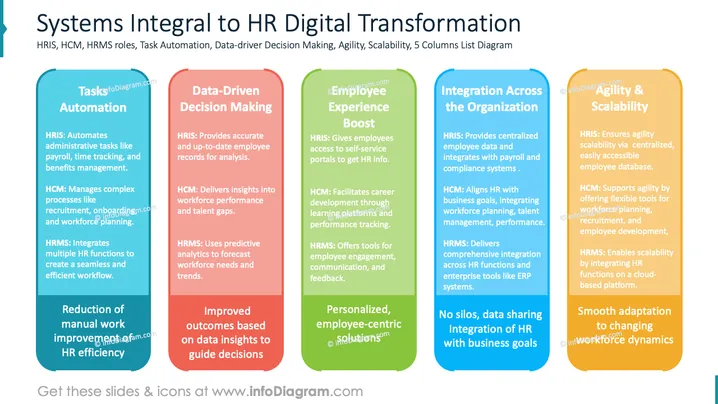
The slide discusses systems essential for HR digital transformation. It highlights Task Automation; HRIS automates tasks like payroll, HCM manages recruitment processes, and HRMS integrates HR functions. Data-Driven Decision Making includes HRIS for accurate records, HCM for performance insights, and HRMS for predictive analytics. Employee Experience Boost emphasizes self-service HR info, career development, and employee engagement. Integration Across the Organization covers centralized data and business alignment. Lastly, Agility & Scalability focuses on easily accessible employee databases and cloud-based HR functions.
Graphical Look
- Five Vertical Columns: Each column has a distinct color and contains a different aspect of HR systems.
- Colors: Blue, red, green, darker blue, and orange, each denoting a different section.
- Text Arrangement: Bullet points detail specific roles and benefits in each column.
- Rounded Corners: Columns have rounded edges, creating a friendly appearance.
- Contrasting Font: Titles and main points are bold for readability against the colorful backgrounds.
Overall, the slide is visually balanced with vibrant colors that separate the information clearly. The use of rounded columns adds a modern and approachable design.
Use Cases
- HR System Presentations: To explain the benefits of HR systems during a corporate presentation.
- Digital Transformation Meetings: To illustrate HR transformation strategies within companies.
- Employee Training Sessions: As a teaching aid to understand HR tools and systems.
- Strategic Business Planning: Utilize when discussing organizational growth and tech integration strategies.
How to Edit
How to edit text & colors

How to expand / shorten diagram

How to Replace Icons in infoDiagram PPT


