
Reviews
Sus gráficos añaden un toque agradable a mis presentaciones y recientemente los usé para una de mis reuniones generales. Su conjunto de herramientas añade profesionalismo a mis diapositivas. En lugar de usar imágenes prediseñadas estándar.
Necesitaba un aspecto fresco para algunas de mis diapositivas. Había intentado encontrar una forma de crear un efecto de pincel, de subrayar, acentuar, añadir algo de color y los marcadores escritos a mano fueron justo lo que necesitaba. Muy fácil de usar, fácil de ajustar el tamaño, cambiar el color. Fue una solución asequible y perfecta, y estoy feliz de recomendarla.
El aspecto nítido y limpio de los gráficos, y el hecho de que me permitiera editar y cambiar fácilmente los colores para que coincidieran con la plantilla fue mi principal razón para comprarlos.
Description
Poll survey
Slide Content
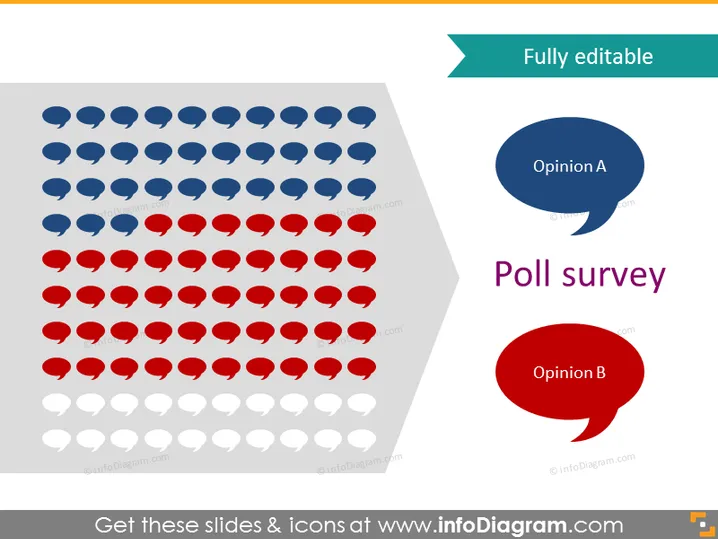
The slide represents a poll survey with a visual distribution of votes or opinions. Blue and red speech bubbles symbolize Opinion A and Opinion B, respectively, indicating two contrasting viewpoints or answers. The amount of each color suggests the number or proportion of responses for each opinion, with grayed-out bubbles seemingly representing uncast votes or a baseline for comparative purposes.
Graphical Look
- The dominant graphical objects are the speech bubble icons arranged in a large rectangle on the left side of the slide.
- Two larger speech bubbles on the right side are colored in blue and red and contain text "Opinion A" and "Opinion B."
- The slide uses a limited color palette, primarily blue, red, white, and varying shades of gray.
- The text "Poll survey" is prominently displayed on the upper right side with a bold, modern font.
- Speech bubbles vary in opacity, with blue and red ones being fully opaque and gray ones semi-transparent.
The overall look of the slide is clean and modern, employing simple shapes (speech bubbles) and a clear color coding (blue and red) to convey polling data visually. It strategically uses opacity to distinguish between active responses and a baseline or potential responses.
Use Cases
- To present the results of a customer satisfaction survey during a business meeting.
- As a visual representation of market research findings in a marketing presentation.
- To compare employee feedback on different company initiatives during internal strategy sessions.
- Illustrating voting outcomes or public opinion in educational or training settings on data interpretation.
How to Edit
How to edit text & colors

How to expand / shorten diagram

How to Replace Icons in infoDiagram PPT


