
Reviews
Sus gráficos añaden un toque agradable a mis presentaciones y recientemente los usé para una de mis reuniones generales. Su conjunto de herramientas añade profesionalismo a mis diapositivas. En lugar de usar imágenes prediseñadas estándar.
Necesitaba un aspecto fresco para algunas de mis diapositivas. Había intentado encontrar una forma de crear un efecto de pincel, de subrayar, acentuar, añadir algo de color y los marcadores escritos a mano fueron justo lo que necesitaba. Muy fácil de usar, fácil de ajustar el tamaño, cambiar el color. Fue una solución asequible y perfecta, y estoy feliz de recomendarla.
El aspecto nítido y limpio de los gráficos, y el hecho de que me permitiera editar y cambiar fácilmente los colores para que coincidieran con la plantilla fue mi principal razón para comprarlos.
Description
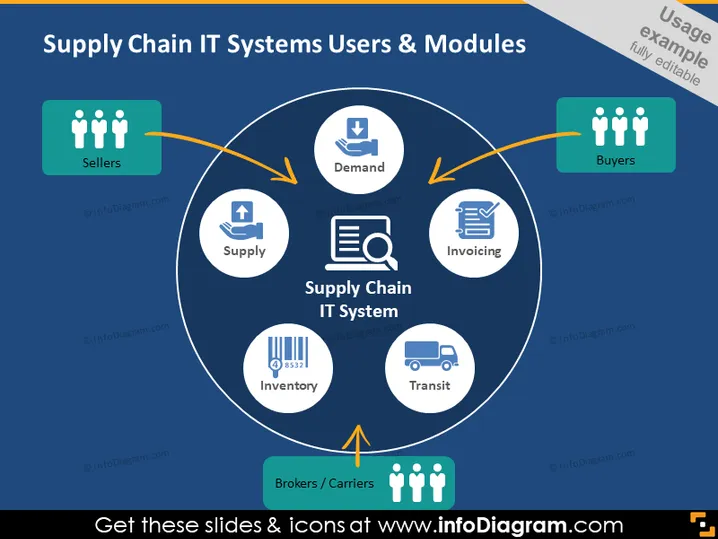
Supply Chain IT Systems Users & Modules
Slide Content
This PowerPoint slide presents an overview of the "Supply Chain IT System" and its various components, focusing on the users and modules. Users include "Sellers," "Buyers," and "Brokers/Carriers," each connect through the central system, suggesting interaction and the flow of information. The modules within the system are "Supply," indicating the management of goods supply, "Demand," for monitoring consumer demand, "Invoicing," representing billing processes, "Inventory," for stock management, and "Transit," which tracks the transportation of goods.
Graphical Look
- Background: Dark blue
- Central graphic: A large circle labeled "Supply Chain IT System" with five icons representing different system modules
- Icons: Simple and representative of their functions, such as a download arrow for Demand and a barcode for Inventory
- User icons: Three stylized human figures on colored backgrounds representing Sellers, Buyers, and Brokers/Carriers
- Arrows: Orange arrows connecting the user icons to the central system circle, suggesting interaction and flow
- Text annotations: Each user module description is in a small, legible font
The slide has a clean, professional design with a good use of icons and arrows to visually represent the flow and connections within a supply chain IT system.
Use Cases
- Presenting an IT solution for supply chain management in a business meeting
- Explaining the interaction of various roles in a supply chain during a training session
- Pitching an IT system upgrade to stakeholders showing the integration of different users and modules
- Use during a Sales pitch to demonstrate how a software can streamline supply chain operations
How to Edit
How to edit text & colors

How to expand / shorten diagram

How to Replace Icons in infoDiagram PPT


