
Reviews
Your graphics add a nice touch to my presentations and I recently used them for one of my all-hands meetings. Your toolbox adds professionalism to my slides. Instead of using standard clipart.
I needed a fresh look at some of my slides. I've tried to find a way to create a paintbrush effect, to underline, accentuate, add some color and the handwritten markers were just the things. Very easy to use, easy to size, change the color. It was an affordable, perfect solution and I'm happy to recommend it.
The crisp, clean look of the graphics, and the fact that it allowed me to easily edit and change the colors to match the template was my main reason for purchasing them.
Description
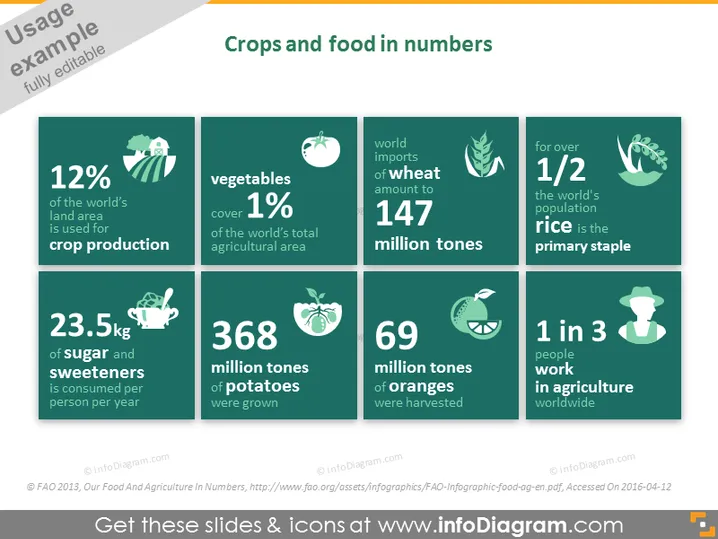
Crops and food in numbers
Slide Content
This PowerPoint slide titled "Crops and food in numbers" presents statistical data on global agriculture and food consumption. It's divided into six sections with individual statistics. "12% of the world's land area is used for crop production" indicates a minor portion of global land is agricultural. Vegetables occupy "1% of the world's total agricultural area," depicting their relatively small land use. The "23.5 kg of sugar and sweeteners consumed per person per year" suggests high consumption rates. "368 million tonnes of potatoes were grown" and "69 million tonnes of oranges were harvested" provide insights into the production volume of these crops. The slide concludes with "147 million tonnes" indicating the global wheat imports and two ratios: "1/2" signifying over half the population rely on rice as a staple and "1 in 3 people work in agriculture worldwide" highlights the sector's employment significance.
Graphical Look
- The slide features a dark green background with a two-column grid of six tiles in a contrasting lighter green.
- Each tile contains a white icon symbolizing the statistic it accompanies, such as a tractor, vegetable, wheat sheaf, rice bowl, orange, or chef's hat.
- The statistics are prominently displayed in large white font and symbols, like percentages and weights, making them stand out.
- The icons also utilize additional thematic colors like white, beige, and a pale green for detailing.
- The overall design language is modern, with flat icons and minimalistic design elements.
The slide has a clean and professional look, with the statistics easily readable due to the stark contrast in colors and large text. The icons are well-chosen to visually represent each corresponding statistic in an intuitive way.
Use Cases
- To present agricultural statistics in educational settings, such as schools or universities.
- As part of a business presentation, highlighting market potential or consumer behaviors related to food products.
- In an agricultural report to show trends and data insights during industry conferences or meetings.
- For non-profit or government presentations addressing food security, land usage, or economic impacts of agriculture on society.
How to Edit
How to edit text & colors

How to expand / shorten diagram

How to Replace Icons in infoDiagram PPT


