
Reviews
Ihre Grafiken verleihen meinen Präsentationen eine nette Note, und ich habe sie kürzlich für eines meiner All-Hands-Meetings verwendet. Ihre Toolbox verleiht meinen Folien Professionalität, anstatt Standard-Clipart zu verwenden.
Ich brauchte einen neuen Blick auf einige meiner Folien. Ich habe versucht, einen Weg zu finden, einen Pinselschlag-Effekt zu erzielen, um zu unterstreichen, hervorzuheben, Farbe hinzuzufügen, und die handgeschriebenen Markierungen waren genau das Richtige. Sehr einfach zu bedienen, leicht in der Größe zu ändern, die Farbe zu ändern. Es war eine erschwingliche, perfekte Lösung und ich empfehle sie gerne weiter.
Die klare, saubere Optik der Grafiken und die Tatsache, dass ich die Farben leicht bearbeiten und an die Vorlage anpassen konnte, war mein Hauptgrund für den Kauf.
Description
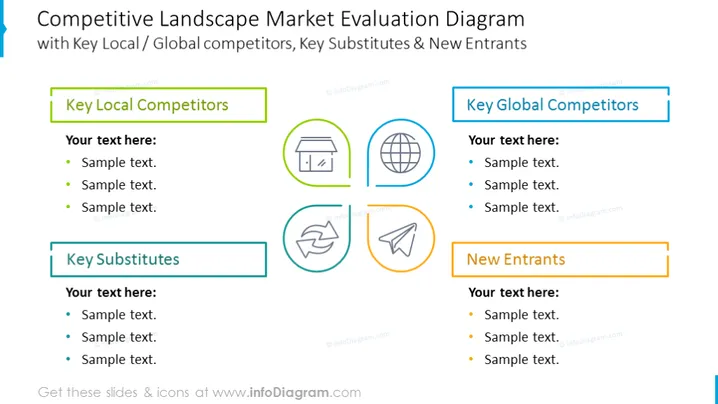
Competitive Landscape Market Evaluation Diagram
Slide Content
The slide is titled "Competitive Landscape Market Evaluation Diagram" and subdivided into four sections, each with bullet points for additional text. "Key Local Competitors" and "Key Global Competitors" likely refer to businesses operating on different scales that compete within the market. "Key Substitutes" could represent alternative products or services that might replace the current ones. Lastly, "New Entrants" denotes recently emerged competitors that could disrupt the market status quo.
Graphical Look
- The title is prominently placed at the top of the slide in bold letters.
- There are four content blocks, each paired with a distinct icon.
- The content blocks are color-coded: green for 'Key Local Competitors,' blue for 'Key Global Competitors,' teal for 'Key Substitutes,' and orange for 'New Entrants.'
- Icons include a storefront for 'Key Local Competitors,' a globe for 'Key Global Competitors,' a recycling symbol for 'Key Substitutes,' and a megaphone for 'New Entrants.'
- Each content block contains placeholder text, indicating where presenters should add their information.
The slide has a clean and structured layout with clear divisions between sections, using a combination of icons and color-coding to differentiate them, which simplifies the processing of information for the audience.
Use Cases
- Presenting a business strategy or market analysis report to stakeholders.
- Use in a marketing or business development meeting to discuss competitive positioning.
- Briefing a product development team on the market context for innovation planning.
- Incorporation into investor presentations to highlight market dynamics and potential threats.
How to Edit
How to edit text & colors

How to expand / shorten diagram

How to Replace Icons in infoDiagram PPT


