

Your graphics add a nice touch to my presentations and I recently used them for one of my all-hands meetings. Your toolbox adds professionalism to my slides. Instead of using standard clipart.
Claude Jones, Director of Engineer, @Walmartlabs, USA

Your graphics add a nice touch to my presentations and I recently used them for one of my all-hands meetings. Your toolbox adds professionalism to my slides. Instead of using standard clipart.
Claude Jones, Director of Engineer, @Walmartlabs, USA
I needed a fresh look at some of my slides. I've tried to find a way to create a paintbrush effect, to underline, accentuate, add some color and the handwritten markers were just the things. Very easy to use, easy to size, change the color. It was an affordable, perfect solution and I'm happy to recommend it.
Anonymous, US
The crisp, clean look of the graphics, and the fact that it allowed me to easily edit and change the colors to match the template was my main reason for purchasing them.
Brandie Jenkins, E-learning Developer, USA
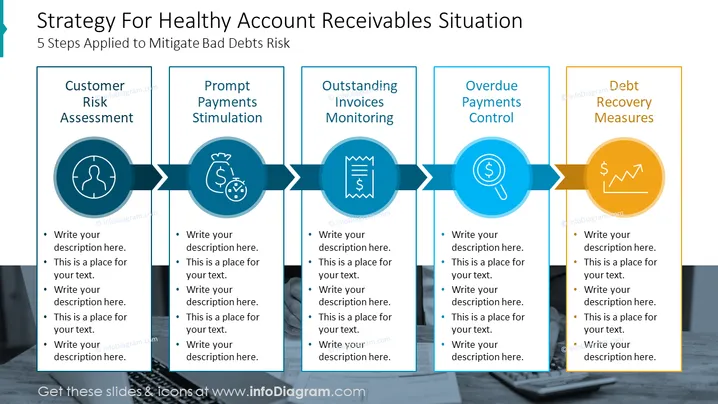
The slide titled "Strategy For Healthy Account Receivables Situation" outlines a 5-step process aimed at mitigating the risk of bad debts. Each step is represented by a distinct box connected in sequence, suggesting a workflow or progression. The steps are "Customer Risk Assessment," which likely involves evaluating the financial reliability of clients; "Prompt Payments Stimulation," aiming to encourage timely payments; "Outstanding Invoices Monitoring," which involves tracking unpaid invoices; "Overdue Payments Control," focused on managing late payments; and "Debt Recovery Measures," outlining actions to recover owed money.
The overall look of the slide is sleek and business-like, with icons and colors making it easy to differentiate between the steps. The design is visually engaging, guiding the viewer's eye across the process flow from left to right.



